Mar 10, 2026

Jan 02, 2026
6 Mins Read
Jul 16, 2026
Table Of Content
Related Articles

SMS Bombing

Threat Actors
Jan 08, 2026

Dark Web Monitoring
Feb 19, 2026

Ransomware
Jan 31, 2026

OSINT Framework
Apr 17, 2026

What Is a DNS Leak Test?
A DNS leak test checks whether your DNS requests are exposed while you are online. It shows if your device sends DNS queries outside a secure connection, such as a VPN. When this happens, your internet activity may be visible to third parties.
A DNS leak test helps confirm that your DNS traffic stays private.
DNS Leak Test Definition
A DNS leak test is a simple check that identifies which DNS servers handle your requests. It compares the expected DNS path with the actual one.
If the test shows DNS servers from your internet provider instead of your VPN or chosen DNS service, a DNS leak exists.
What a DNS Leak Is
A DNS leak occurs when DNS queries bypass a secure tunnel. Even if your IP address is hidden, DNS requests can reveal your location and browsing activity.
This creates a privacy gap. Websites and networks may still track or log your activity through DNS.
How DNS Leaks Occur
DNS leaks usually happen due to configuration issues. A VPN may not force DNS traffic through its tunnel.
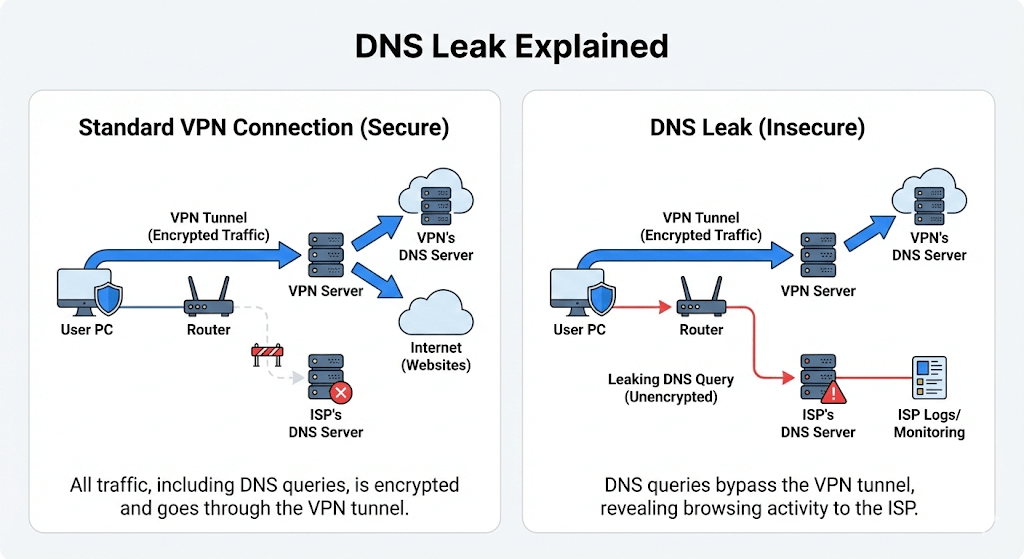
DNS Leak Explained
Operating system settings, browser behavior, or split tunneling features can also cause leaks. In some cases, system updates reset DNS settings without notice.
These issues often go unnoticed without testing.
How a DNS Leak Test Works
A DNS leak test sends controlled DNS queries from your device. It then detects which DNS servers respond.
The test lists server locations and providers. This data shows whether requests stay inside the secure connection or leak outside.
Most DNS leak tests run in seconds and require no setup.
Interpreting DNS Leak Test Results
Test results usually show one or more DNS servers.
If the servers belong to your VPN provider or trusted DNS service, the setup is working. If the servers belong to your ISP or local network, there is a DNS leak.
Clear results make it easy to identify problems.
DNS Leaks and VPNs
VPN users rely on DNS leak tests the most. A VPN hides your IP address, but DNS leaks can undermine that protection.
A secure VPN should route all DNS traffic through its own servers or encrypted channels. DNS leak testing verifies that this protection works as intended.
How to Fix DNS Leaks
Fixing a DNS leak often starts with VPN settings. Many VPNs offer built in DNS leak protection.
Disabling split tunneling can help. Manually setting DNS servers or using firewall rules can also force DNS traffic through the secure path.
After changes, running another DNS leak test confirms the fix.
FAQs
1. What causes a DNS leak?
A DNS leak can occur when a device sends DNS queries outside the expected encrypted path. Common causes include a misconfigured VPN client, operating-system DNS behavior, IPv6 traffic that is not handled by the tunnel, router settings, a transparent DNS proxy, split tunneling, custom DNS configuration, or a VPN connection that drops without blocking traffic.
2. What are the different types of DNS leaks?
A standard DNS leak sends queries to an ISP or another resolver instead of the VPN-provided resolver. An IPv6-related leak occurs when IPv6 DNS or traffic bypasses a VPN that only handles IPv4. A router or network leak results from local gateway or captive-network settings. WebRTC is often tested at the same time, but it is technically an IP-address leak rather than a DNS leak.
3. How does a DNS leak test work?
A test causes the browser or device to request several unique domain names controlled by the testing service. The service records which DNS resolvers handled those queries and displays their IP addresses, providers, or locations. The user then checks whether those resolvers belong to the VPN or chosen DNS service rather than the ISP or local network.
4. What information can a DNS leak expose?
A DNS leak can reveal which domain names a device requests, the DNS resolver being used, the approximate network or ISP, and patterns of browsing activity. DNS queries do not normally contain the full path of an HTTPS page, but they can still disclose which services or domains the user is attempting to reach.
5. How often should someone test for DNS leaks?
Test after installing or changing a VPN, updating the operating system, changing routers or networks, enabling IPv6, modifying DNS settings, or switching VPN protocols. Organizations should also test after major client updates or configuration changes. Periodic checks are useful when privacy or remote-access requirements are high.
6. Can a DNS leak happen without a VPN?
Yes, although the term is most commonly used when DNS bypasses a VPN or encrypted DNS configuration. A device may use an unexpected ISP, router, corporate, or third-party resolver because of network settings, malware, captive portals, or operating-system behavior. The privacy impact depends on which resolver receives the queries and what protections are expected.
7. Is it safe to use a free DNS leak test?
A reputable browser-based test is generally low risk, but the service will necessarily observe the user’s public IP address and the resolvers that answer its test queries. Review the provider’s privacy policy, avoid tools that require unknown software or browser extensions, and do not enter credentials or sensitive information into a testing site.
8. How can a DNS leak be fixed?
Enable the VPN client’s DNS leak protection, use the VPN’s approved DNS resolvers, update the VPN client, review split-tunneling settings, configure encrypted DNS where appropriate, correct router or operating-system DNS settings, and retest. If IPv6 is unsupported, it may need to be securely tunneled or temporarily disabled while the configuration is corrected. Clearing the DNS cache can remove stale resolver information but will not fix an underlying routing problem.
9. What is the difference between DNS leak protection and a VPN kill switch?
DNS leak protection keeps DNS queries inside the intended tunnel or routes them to an approved resolver while the VPN is connected. A kill switch blocks some or all network traffic when the VPN connection fails. Both features reduce exposure, but they address different failure conditions and should be tested rather than assumed to work.
10. What is a WebRTC leak, and how does it relate to DNS leaks?
WebRTC is a browser technology for real-time audio, video, and peer-to-peer communication. In some configurations, it can reveal local or public IP information through browser requests even when a VPN is active. It is not a DNS leak, but privacy test sites often check WebRTC, DNS, IPv4, and IPv6 together because each can reveal network information.
11. How does a VPN protect against DNS leaks?
A properly configured VPN assigns an approved DNS resolver and routes DNS queries through the encrypted tunnel. It may also block external DNS requests, handle both IPv4 and IPv6, and activate a kill switch if the tunnel fails. Protection depends on the VPN client, operating system, protocol, router, and policy configuration, so the connection should be tested after setup and major changes.
Conclusion
A DNS leak test checks whether your DNS traffic stays private. It helps detect configuration issues that expose browsing activity. Running a DNS leak test is a simple and effective way to protect online privacy.