
What Is a Computer Worm?
A computer worm is self-propagating malware that spreads between systems without requiring a user to copy or run it on every new device. A worm may exploit a network service, reuse credentials, abuse shared resources, or move through messaging and removable media.
Self-propagation turns one compromise into a network-wide event. A worm may only spread, or it may deliver ransomware, destructive code, spyware, cryptominers, or a backdoor. Containment must stop movement and correct the weakness that enables reinfection.
Key Takeaways
- A worm spreads automatically, while a conventional virus normally depends on a host file or user action.
- Propagation can use vulnerabilities, credentials, shares, email, cloud services, or removable media.
- Internal scanning, repeated authentication, rapid host-to-host activity, and resource spikes are key signals.
- Containment requires segmentation, patching, credential action, and environment-wide validation.
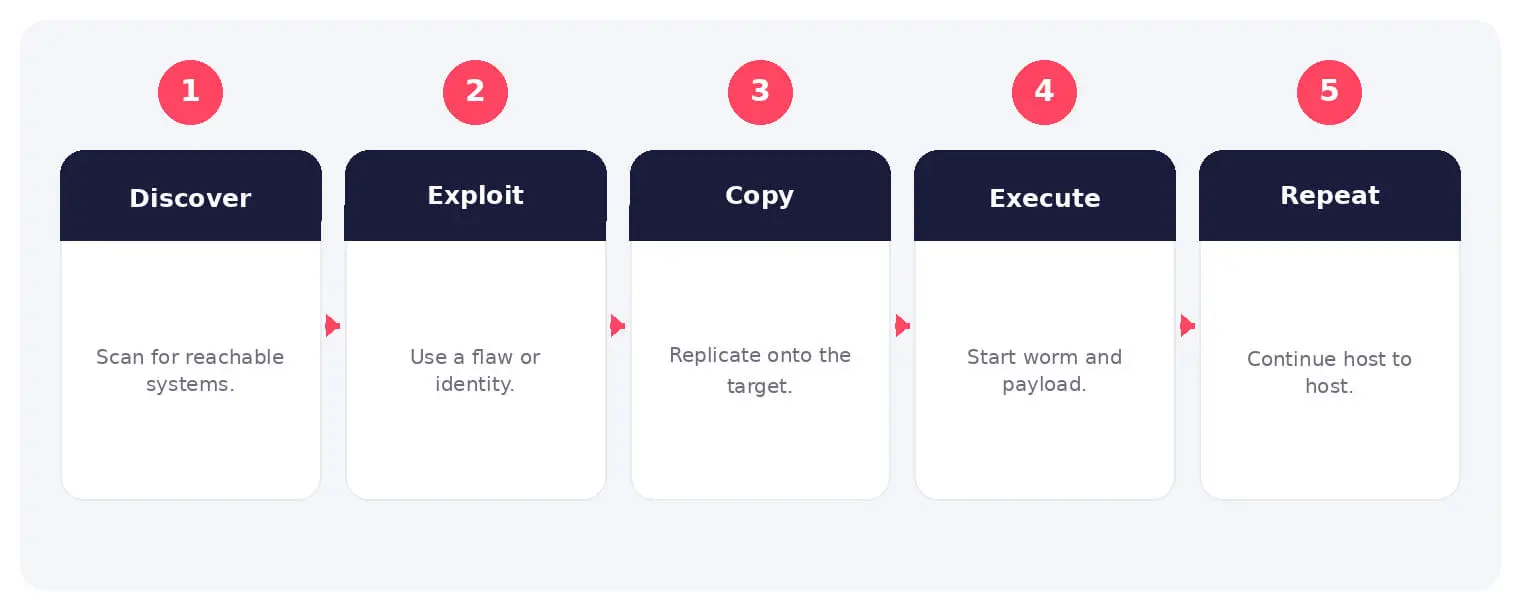
How a Computer Worm Works
A worm discovers reachable systems, tests an access method, copies or recreates itself, and repeats the process. Internet worms scan public addresses, while internal worms can move rapidly after one device is compromised.
Some worms use several propagation methods so blocking one route does not stop the outbreak. They may also install a separate payload that continues after propagation is contained.
Common Types and Techniques
- Network-service exploitation worms
- Credential and administrative-share worms
- Email, messaging, and removable-media worms
- Worm-enabled ransomware or destructive payloads
Security and Business Risks
- Rapid network saturation and service interruption
- Simultaneous compromise of many endpoints and servers
- Credential theft, encryption, destruction, or backdoor installation
- Reinfection from unmanaged or unpatched systems
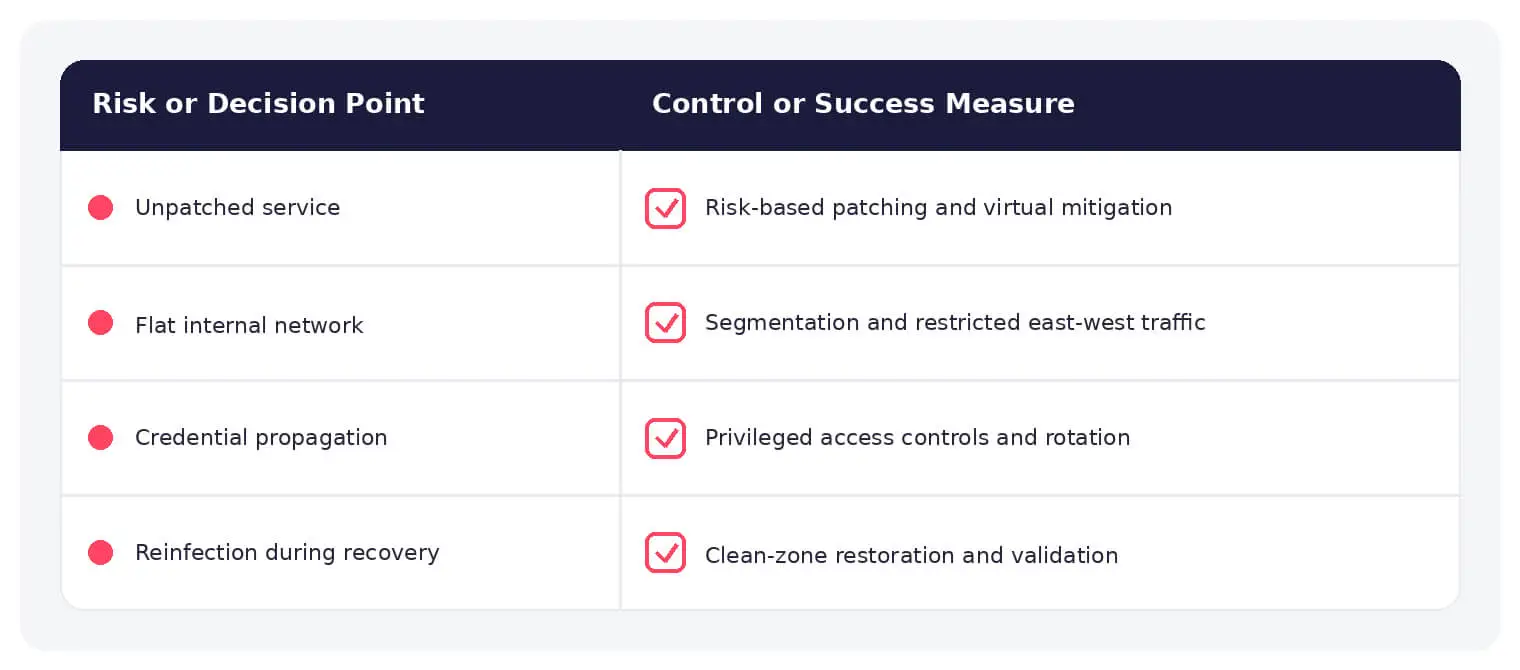
Warning Signs and Detection
Watch for sudden internal scanning, repeated connections to the same ports, authentication failures across hosts, identical processes appearing widely, mass file creation, disabled controls, and rapid changes in network or resource use.
Prevention and Response
Patch exposed and internal services, remove obsolete protocols, segment networks, restrict administrative shares, protect privileged accounts, and detect replication behavior. During recovery, reconnect systems only after propagation paths are closed.
How SOCRadar Can Help
SOCRadar combines external asset visibility, threat intelligence, Dark Web monitoring, vulnerability context, and indicator enrichment to help teams identify exposure and investigate activity connected to computer worm.
Explore SOCRadar Vulnerability Intelligence or request a demo to strengthen threat-informed prevention and investigation.
Frequently Asked Questions
How Is a Computer Worm Different From a Virus?
A virus generally attaches to a host file and relies on a user or process to execute it on each new device. A worm carries its own propagation logic, so a single foothold can turn into a network-wide event without any user action. This difference is why worm incidents escalate faster than typical file-based malware.
What Are the Main Ways Computer Worms Propagate?
Common techniques include exploiting vulnerabilities in network services, reusing stolen credentials to reach administrative shares, attaching to email or chat messages, and copying onto removable media. Many worms combine several of these methods, so closing a single route rarely stops the outbreak on its own.
Can a Computer Worm Deliver Ransomware or Other Payloads?
Yes. The worm is the spreading mechanism, and the payload it drops can be ransomware, destructive code, spyware, a cryptominer, or a backdoor. Worm-enabled ransomware is particularly disruptive because encryption can begin on many systems within the same window instead of one device at a time.
How Fast Can a Worm Spread Across a Network?
Once a worm gains a foothold, internal movement can go from one host to dozens within minutes, especially when vulnerable services are broadly reachable or credentials are reused across machines. Internet worms scanning public address ranges usually move more slowly, but lateral spread inside a flat network is typically the fastest phase of an outbreak.
What Signs Point to Worm Activity on a Network?
Watch for sudden internal scanning, repeated connections to the same ports, authentication failures appearing across many hosts, and identical processes or scheduled tasks showing up on multiple machines. Unexplained spikes in bandwidth or resource use, mass file creation, and security controls being disabled on several endpoints at once are also strong indicators.
How Should Teams Contain an Active Worm Outbreak?
Containment comes before deep cleaning: segment or isolate affected hosts and network segments, block the abused port or service, and disable compromised credentials so the worm cannot reuse them. Preserve logs where practical, and keep cleaned systems offline until the propagation path has been closed and verified.
Why Do Worm Infections Reappear After Cleanup?
Reinfection usually means an access path survived the response: an unpatched service, a still-valid stolen credential, an open administrative share, or one infected device that was never isolated. Removing the malware without closing those paths simply sets up the next outbreak.
How Can Organizations Reduce the Risk of Worm Outbreaks?
Practical controls target the routes worms depend on:
- Patching: remediate known vulnerabilities in exposed and internal services, giving priority to flaws with working exploits.
- Segmentation: limit lateral movement paths such as administrative shares, remote access protocols, and legacy services.
- Credential protection: apply least privilege, MFA, and prompt rotation for privileged accounts.
- Behavioral detection: alert on host-to-host scanning, mass authentication attempts, and unusual file creation.
Because no single control removes worm risk, layered coverage across these areas matters more than any individual tool.
Does a Worm Need Internet Access to Spread?
No. Worms can move through internal networks, shared folders, removable media, messaging systems, and synchronized storage without any connection to the internet. Reachability between hosts is what matters, not a route to the outside world.
Where Does Vulnerability Intelligence Fit Into Worm Defense?
Worms tend to favor services with known, exploitable flaws, so knowing which CVEs are being actively exploited helps teams patch the exact routes a worm would use. SOCRadar Vulnerability Intelligence provides exploitability and KEV context that shows which exposed services deserve attention first, directly shrinking the window a worm depends on.

Oct 16, 2026
CVE-2026-102764: BeyondTrust Zero-Day Exploited
BeyondTrust has disclosed CVE-2026-102764, a critical Remote Support vulnerability exploited as a zero-day weeks before customers received a patch. The attack began…
Oct 15, 2026
Cisco Secure Email & PAN-OS Zero-Days Exploited
Cisco Secure Email & PAN-OS Zero-Days Exploited Cisco and Palo Alto Networks have patched two actively exploited zero-day vulnerabilities that can lead…
Oct 15, 2026
SOCRadar Splunk Integration: New MSSP and Vulnerability Apps
SOCRadar Splunk Integration: New MSSP and Vulnerability Apps Your analysts live in Splunk. Your external risk does not: SOCRadar alarms for dozens…
Intelligence in your inbox every Thursday.
Join 30,000+ security professionals reading SOCRadar research.
Subscribe