
What Is a Botnet?
A botnet is a group of compromised computers, servers, mobile devices, routers, cameras, or other systems controlled as a coordinated network. Each infected device, often called a bot, receives instructions from an operator or automated command infrastructure.
Botnets convert ordinary devices into shared attack capacity. Operators use them for distributed denial-of-service, credential attacks, spam, malware delivery, advertising fraud, cryptomining, data collection, and residential proxy services.
Key Takeaways
- Botnets grow through vulnerabilities, weak credentials, malicious software, and supply-chain compromise.
- Command models may be centralized, peer-to-peer, domain-based, or hidden behind legitimate services.
- Unusual DNS, outbound traffic, resource use, and synchronized behavior can expose infections.
- Patching, unique credentials, segmentation, egress controls, and inventory reduce risk.
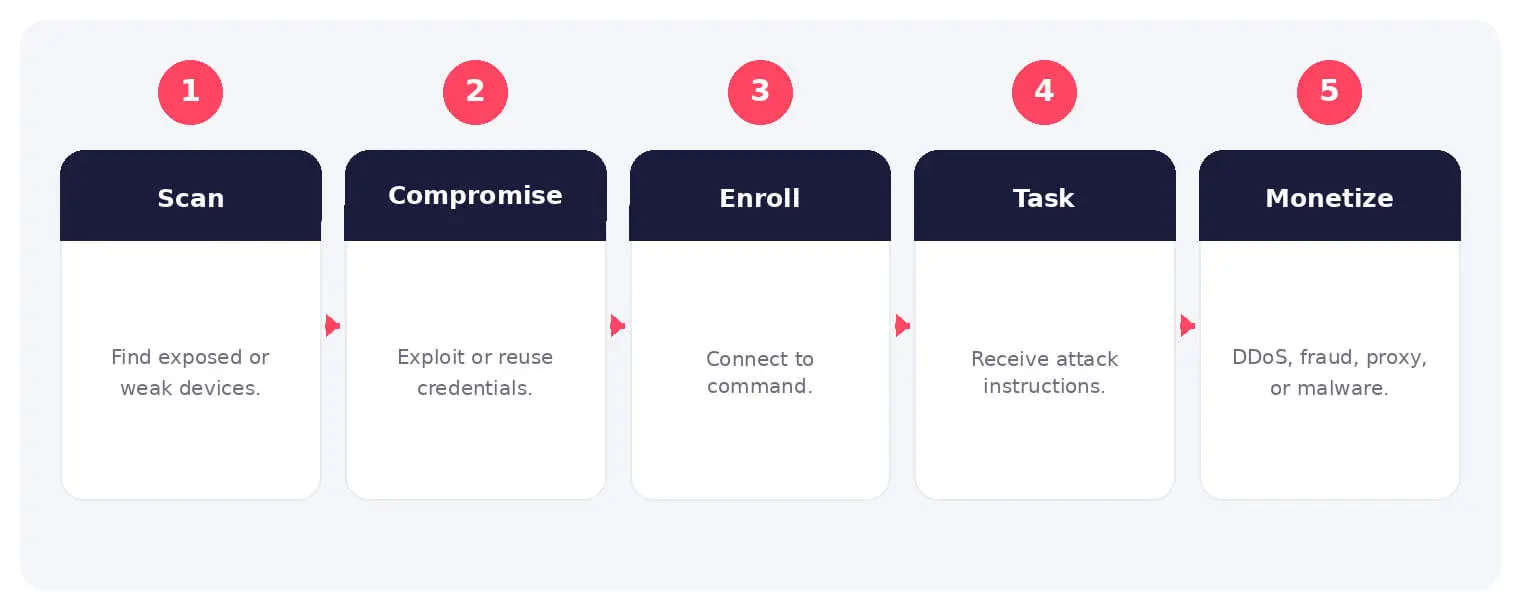
How a Botnet Works
Operators compromise devices through exposed services, default passwords, credential reuse, malware, or vulnerabilities. The installed bot establishes persistence and contacts command infrastructure for tasks.
Centralized botnets use command servers, while peer-to-peer designs distribute coordination. Domain generation, fast-flux hosting, encryption, and legitimate cloud services can make traffic harder to block.
Common Types and Techniques
- DDoS and traffic-generation botnets
- Spam, phishing, and malware-delivery networks
- Credential-testing and fraud automation
- Cryptomining and residential proxy botnets
Security and Business Risks
- Participation in attacks against other organizations
- Performance loss, bandwidth use, and service instability
- Additional malware, credential theft, and privacy exposure
- Reputation damage and provider or regulatory action
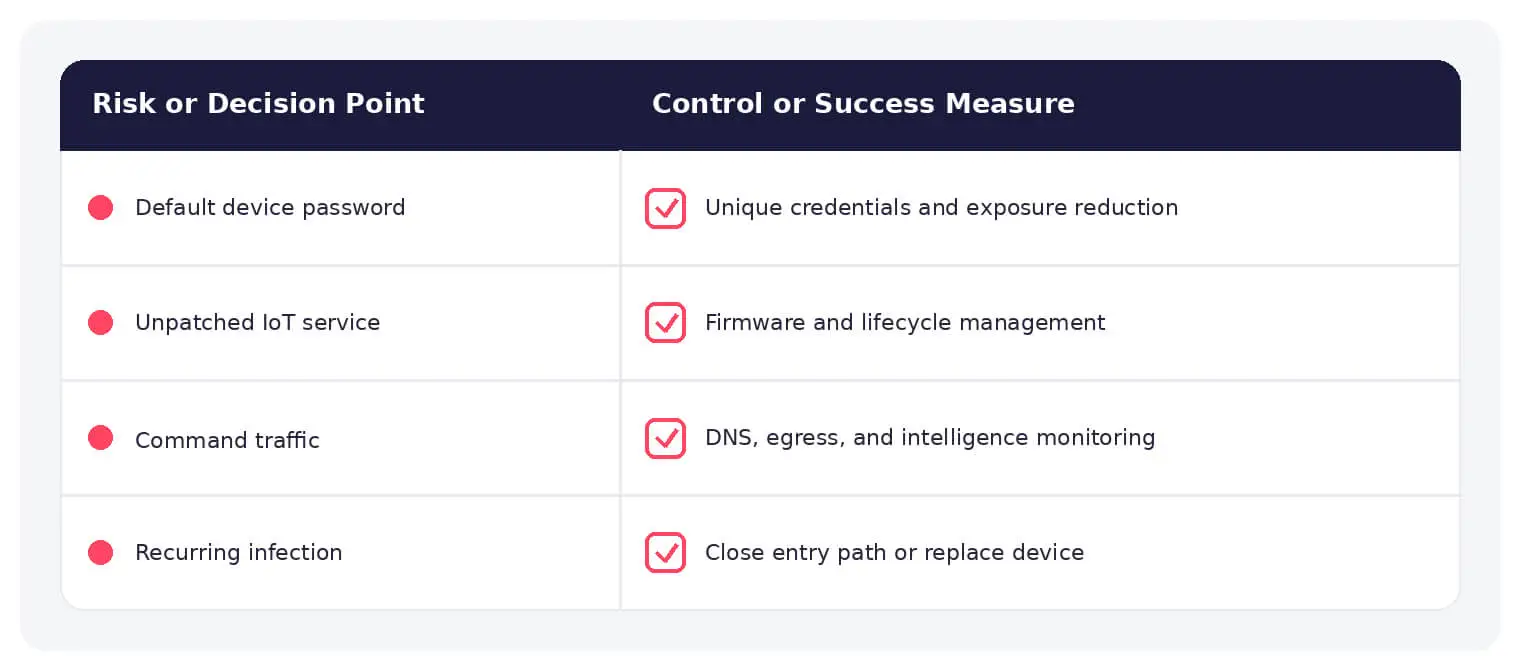
Warning Signs and Detection
Look for recurring connections to rare domains, algorithmic DNS, spikes in CPU or bandwidth, external login attacks, new startup entries, and synchronized behavior across devices. Correlate network, endpoint, and threat-intelligence data.
Prevention and Response
Maintain asset inventory, remove unnecessary exposure, patch firmware and software, replace default credentials, segment IoT networks, restrict outbound traffic, and replace unsupported devices. Search for the same behavior across similar assets after any infection.
How SOCRadar Can Help
SOCRadar combines external asset visibility, threat intelligence, Dark Web monitoring, vulnerability context, and indicator enrichment to help teams identify exposure and investigate activity connected to botnet.
Explore SOCRadar Extended Threat Intelligence or request a demo to strengthen threat-informed prevention and investigation.
Frequently Asked Questions
What Exactly Turns a Device Into a Bot?
A device becomes a bot when an attacker gains code execution or access and installs software that lets it receive and act on remote instructions. This can follow a successful exploit, a guessed or reused password, a malicious download, or a compromised update. Once the bot establishes persistence and reaches its command infrastructure, the owner often has little indication anything has changed.
What Do Botnet Operators Do With Compromised Devices?
Beyond launching DDoS attacks, operators use bots to send spam, deliver malware, test stolen credentials against login portals, mine cryptocurrency, commit advertising fraud, scrape content, and relay traffic as residential proxies. Some networks are rented out as a service, and a single botnet can shift between purposes over time.
How Do Bots Receive Instructions From Their Operators?
Centralized botnets pull tasks from command-and-control servers, while peer-to-peer designs spread coordination across the bots themselves, leaving no single point to take down. Operators add layers such as domain generation algorithms, fast-flux hosting, encryption, and abuse of legitimate cloud services to keep command channels reachable and harder to block.
Why Do Routers, Cameras, and Other IoT Devices Attract Botnet Operators?
These devices often run exposed management services, ship with default or weak credentials, and receive little firmware maintenance, which makes them inexpensive to compromise at scale. Entire botnet families have grown largely by scanning the internet and trying factory-default passwords. Because owners rarely monitor these devices, infections can persist unnoticed for months.
Which Signs Suggest a Device Has Joined a Botnet?
Useful indicators include recurring connections to rare or recently registered domains, bursts of outbound traffic at unusual hours, sustained CPU or bandwidth use without a matching workload, new startup entries or processes, and synchronized behavior appearing on multiple devices at once. Correlating endpoint logs with network telemetry and threat-intelligence data makes these patterns easier to confirm.
Can a Bot Stay Hidden Even When the Device Is Active?
Yes. Many bots throttle their resource use, run tasks only during idle periods, or wait dormant for commands, so an infected device may show no obvious slowdown. This quiet behavior is why network-level checks, such as DNS requests to algorithmically generated domains, often catch infections that day-to-day use never reveals.
What Should You Do First After Finding an Infected Device?
Isolate the device from the network so it can no longer receive commands or participate in attacks, then capture logs and indicators before cleaning or reimaging it. Search the rest of the environment for the same indicators, since one infection rarely appears alone. In serious incidents, rebuilding from trusted media and rotating credentials for connected accounts may be the safest path.
Does a Factory Reset Remove Botnet Malware From an IoT Device?
A reset clears many user-space infections but does nothing about the exposed service or weak credential that allowed the compromise in the first place, so the device can be reinfected quickly if it rejoins the network unchanged. Update the firmware, set unique credentials, disable unneeded services, and restrict management access before reconnecting it. Devices that no longer receive vendor updates should be replaced.
How Can Organizations Reduce the Risk of Devices Joining a Botnet?
Practical measures include:
- Inventory: keep a current list of every device and workload connected to the network.
- Patching: apply firmware and software updates promptly and retire unsupported devices.
- Credentials: replace default and reused passwords with unique, strong ones.
- Segmentation and egress control: separate IoT systems from business networks and filter outbound connections to unknown destinations.
Reducing unnecessary internet exposure removes many of the entry points botnet operators depend on.
What Are the Consequences if Your Devices Attack Other Networks?
An organization whose systems participate in attacks can face blacklisting, blocked traffic or mail from providers, degraded service for its own users, and reputational or even regulatory consequences. Because attribution points to the infected network, victims and hosting providers may treat the device owner as the source of the problem. Documenting cleanup and incident response helps when disputing listings or restoring trust.
How Does Threat Intelligence Support Botnet Defense?
Known command-and-control domains, IP addresses, and malware hashes let teams flag botnet traffic before it succeeds, while monitoring underground markets reveals rented botnet offerings and leaked credentials that could feed future infections. SOCRadar, for example, pairs Dark Web monitoring with indicator enrichment so security teams can surface botnet-related infrastructure and exposed credentials relevant to their own environment.

Oct 16, 2026
CVE-2026-102764: BeyondTrust Zero-Day Exploited
BeyondTrust has disclosed CVE-2026-102764, a critical Remote Support vulnerability exploited as a zero-day weeks before customers received a patch. The attack began…
Oct 15, 2026
Cisco Secure Email & PAN-OS Zero-Days Exploited
Cisco Secure Email & PAN-OS Zero-Days Exploited Cisco and Palo Alto Networks have patched two actively exploited zero-day vulnerabilities that can lead…
Oct 15, 2026
SOCRadar Splunk Integration: New MSSP and Vulnerability Apps
SOCRadar Splunk Integration: New MSSP and Vulnerability Apps Your analysts live in Splunk. Your external risk does not: SOCRadar alarms for dozens…
Intelligence in your inbox every Thursday.
Join 30,000+ security professionals reading SOCRadar research.
Subscribe